Arrow Functions in JavaScript: A Simpler Way to Write Functions
A Simpler Way to Write Functions Syntax | Implicit Return | Parameters | Array Methods

What are Arrow Functions?
Arrow functions are a shorter, cleaner way to write functions in JavaScript, introduced in ES6(2015). They are used everywhere in modern JavaScript code - inside array methods, as callbacks, in React components and moree...
Here is a normal function and its arrow function equivalent:
//Normal Function
function add(a, b){
    return a + b;
}

//Arrow Function - same thing less line of code
const add = (a, b) => a + b;

console.log(add(3, 5));   // 8
Both functions produce the exact same result. The arrow function just removes the function keyword, no extra braces when not needed, no return for simple expressions.
Why are these called as arrow functions?
Because of the symbol => which looks similar like an arrow pointing right. This arrow separates the parameters on the left from the function body on the right.
Arrow Function Syntax
Before writing any arrow function, it helps to understand exactly what every part means.
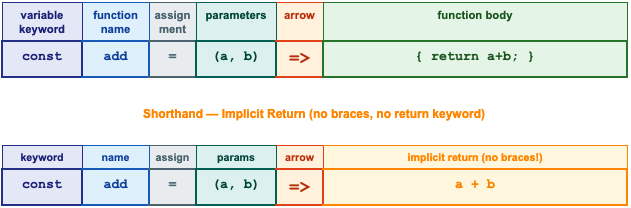
The two key rules to remember:
Explicit return - use curly braces { } and the return keyword when we have multiple lines of code.
Implicit return - skip the braces and return entirely when the body is a single expression. JavaScript returns it automatically.
Normal Function to Arrow Function
The best way to get comfortable with arrow functions is to see how a normal function transforms into one, step by step:
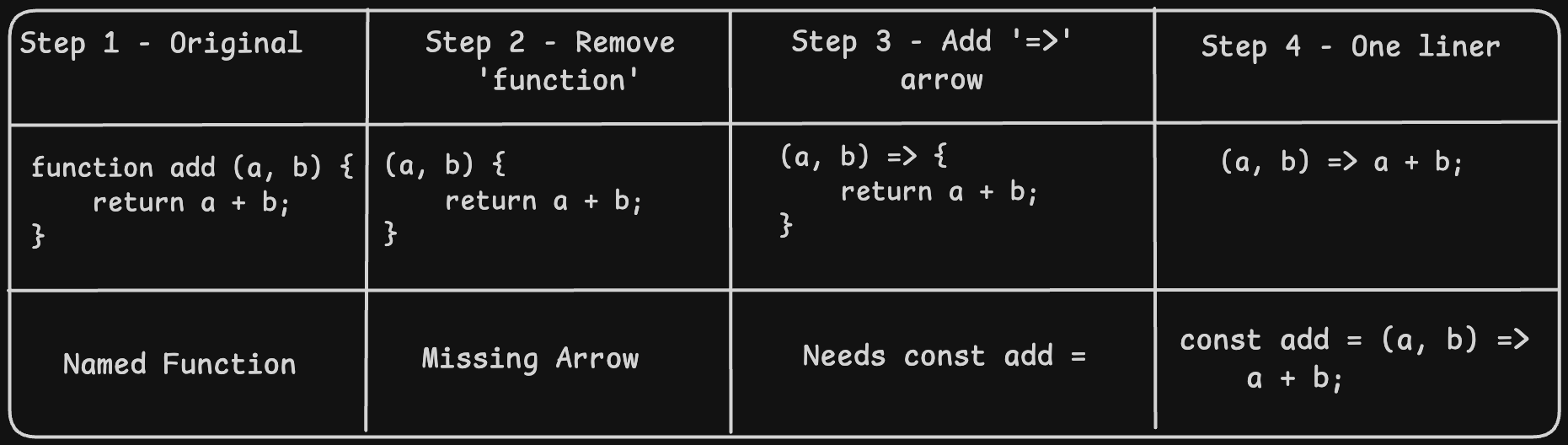
The three step transformation
Remove the 'function' keyword
Add => after the parameters
If body is one expression: remove braces and return keyword.
// Normal function                    Arrow function
function double(n) {                   const double = n => n * 2;
  return n * 2;
}


function square(n) {                   const square = n => n * n;
  return n * n;
}


function greet(name) {                 const greet = name => 'Hi ' + name;
  return 'Hi ' + name;
}


// All produce same results:
console.log(double(5));   // 10
console.log(square(4));   // 16
console.log(greet('Riya'));  // Hi Riya
Arrow Functions and Parameters
Arrow functions handle parameters in three different ways depending on how many parameters we have:
| 0 params | 1 param | 2+ params |
|---|---|---|
| () = > | x => expression | (x, y) => expression |
| const greet = () => 'Hello'; | const double = x => x * 2 | const add = (a,b) => a +b; |
| Round bracket required | Round bracket optional | Round bracket required |
No parameters - always use empty()
// Must use empty parentheses when there are no parameters
const sayHello = () => 'Hello, World!';
const getTime  = () => new Date().getFullYear();
const rollDice = () => Math.floor(Math.random() * 6) + 1;


console.log(sayHello());   // Hello, World!
console.log(getTime());    // 2025  (or current year)
console.log(rollDice());   // 1 to 6  (random)
One parameter - parentheses are optional
// Both forms work - parentheses are optional for ONE param
const double1 = n => n * 2;       // without parens
const double2 = (n) => n * 2;     // with parens  (also fine)


const greet1  = name => 'Hi ' + name + '!';
const isEven  = num  => num % 2 === 0;


console.log(double1(7));     // 14
console.log(greet1('Arjun')); // Hi Arjun!
console.log(isEven(8));      // true
console.log(isEven(9));      // false
Many people always include parens even for a single parameter - like (num) => ... because it looks. consistent and is easier to spot.
Multiple parameter - parentheses always required
// Two or more parameters ALWAYS need parentheses
const add      = (a, b)    => a + b;
const multiply = (a, b)    => a * b;
const greetFull= (first, last) => 'Hello, ' + first + ' ' + last;
const clamp    = (val, min, max) => Math.min(Math.max(val, min), max);


console.log(add(10, 5));              // 15
console.log(multiply(4, 7));          // 28
console.log(greetFull('Riya','Patel')); // Hello, Riya Patel
console.log(clamp(15, 0, 10));        // 10
Implicit Return vs Explicit Return
This is one of the most commonly confused part of arrow functions. It depends on whether we can use curly braces or not.
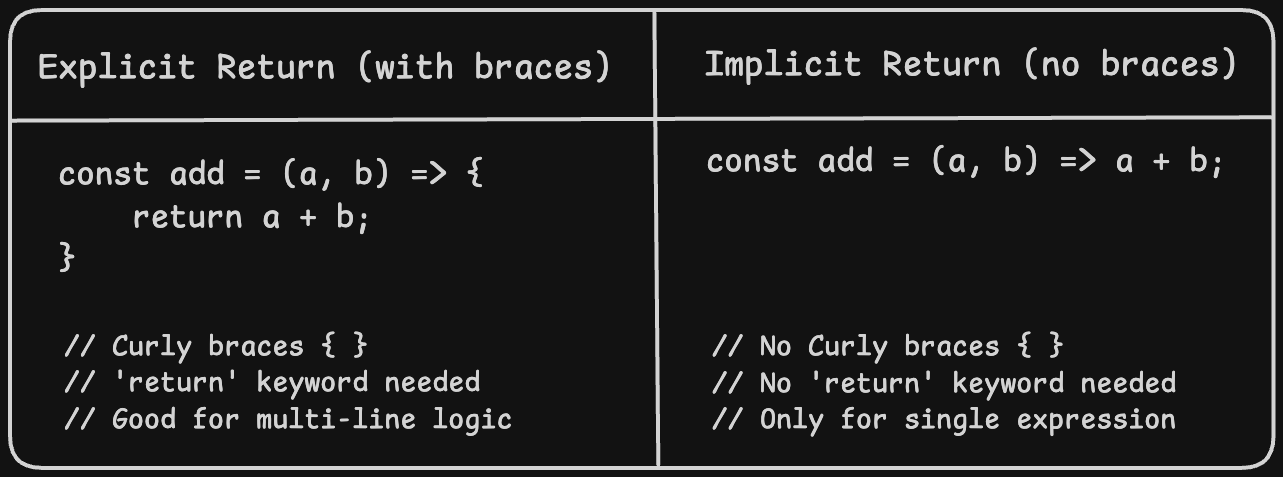
Explicit Return - use braces, use return
We use this when the function body has more than one line, or when we have conditions, loops, or multiple steps.
// Multi-line logic needs explicit return
const describe = (num) => {
  if (num > 0)  return 'positive';
  if (num < 0)  return 'negative';
  return 'zero';
};


console.log(describe(5));    // positive
console.log(describe(-3));   // negative
console.log(describe(0));    // zero


// Calculate grade
const grade = (marks) => {
  if (marks >= 90) return 'A';
  if (marks >= 70) return 'B';
  if (marks >= 50) return 'C';
  return 'F';
};


console.log(grade(85));    // B
console.log(grade(45));    // F
Implicit Return - no braces, no return
We use this when the function body is a single expression. It's the most common form because it is so consise.
// Single expression - return is automatic
const double    = n => n * 2;
const square    = n => n * n;
const isAdult   = age => age >= 18;
const fullName  = (f, l) => f + ' ' + l;
const celToFar  = c => (c * 9/5) + 32;


console.log(double(6));              // 12
console.log(square(9));              // 81
console.log(isAdult(20));            // true
console.log(isAdult(15));            // false
console.log(fullName('Aisha','Khan')); // Aisha Khan
console.log(celToFar(100));          // 212
Common mistakes to avoid
If we add curly braces, we must write return explicitly even for one line.
const double = n => { n * 2 }; // WRONG --> will return undefined
const double = n => { return n * 2}; // CORRECT
const double = n => n * 2; // CORRECT (no braces)
Arrow Function vs Normal Function
While arrow functions are shorter, they have some real differences from normal functions beyond just syntax.
Feature | Normal Function | Arrow Function |
Keyword used | function keyword | No function keyword, uses => |
Syntax length | More verbose | Shorter and cleaner |
Naming | function greet() {} | const greet = () => {} |
Single expression | Must use return | Can omit return and braces |
Hoisting | Yes - can call before | No - variable must be defined first |
'this' keyword | Has its own 'this' | Inherits 'this' from outside |
Used as method? | Yes - works well | Avoid (this behaves differently) |
As callback? | Works fine | Very common and preferred |
Best for | Named reusable functions | Callbacks, array methods, short ops |
The 'this' keyword
One key difference is that arrow functions do NOT have their own 'this'. They inherit 'this' from the surrounding code. We use normal functions for object methods, and arrow functions everywhere else.
Where Arrow Functions Really Shine - Array Methods
Arrow functions were practically built for array methods like map(), filter() and forEach(). The short the syntax makes these methods readable.
| map() | filter() | forEach() |
|---|---|---|
| num => num * 2 | num => num > 3 | num => console.log(num) |
| Input: [1, 2, 3, 4, 5] | Input: [1, 2, 3, 4, 5] | Input: [1, 2, 3] |
| Output: [2, 4, 6, 8, 10] | Output: [4, 5] | Output: 1, 2, 3 |
map() - transform each element
const numbers = [1, 2, 3, 4, 5];


// Long way (normal function)
const doubled1 = numbers.map(function(n) { return n * 2; });


// Short way (arrow function)
const doubled2 = numbers.map(n => n * 2);


console.log(doubled2);   // [2, 4, 6, 8, 10]


// Square every number
const squared = numbers.map(n => n * n);
console.log(squared);    // [1, 4, 9, 16, 25]


// Celsius to Fahrenheit
const temps = [0, 20, 37, 100];
const farenheit = temps.map(c => (c * 9/5) + 32);
console.log(farenheit);  // [32, 68, 98.6, 212]
filter() - keep matching elements
const numbers = [3, 7, 12, 5, 18, 2, 20, 9];


const bigNums   = numbers.filter(n => n > 10);
const evenNums  = numbers.filter(n => n % 2 === 0);
const smallOdds = numbers.filter(n => n < 10 && n % 2 !== 0);


console.log(bigNums);    // [12, 18, 20]
console.log(evenNums);   // [12, 18, 2, 20]
console.log(smallOdds);  // [3, 7, 5, 9]
forEach() - do something with each element
const fruits = ['Apple', 'Banana', 'Mango'];


// Print each fruit
fruits.forEach(fruit => console.log(fruit));
// Apple
// Banana
// Mango


// Print with index
fruits.forEach((fruit, i) => console.log(i+1 + '. ' + fruit));
// 1. Apple
// 2. Banana
// 3. Mango
All Syntax Forms
Form | Syntax | Example |
No params | () => expression | const greet = () => 'Hello!'; |
One param | x => expression | const double = x => x * 2; |
One param alt | (x) => expression | const double = (x) => x * 2; |
Multi params | (x, y) => expression | const add = (a, b) => a + b; |
Explicit return | (x) => { return x*2; } | const triple = x => { return x*3; }; |
Multi-line body | (x) => { ...code... } | const fn = x => { let r=x*2; return r; }; |
In map() | arr.map(x => ...) | [1,2,3].map(n => n * 10) |
In filter() | arr.filter(x => ...) | [1,2,3,4].filter(n => n > 2) |
Practice Assignment
Task 1 - Normal function for square of a number
// Write as a traditional function first
function square(n) {
  return n * n;
}
console.log(square(7));    // 49
console.log(square(12));   // 144
Task 2 - Rewrite as an arrow function
// Convert Task 1 to arrow function
const square = n => n * n;


// Try all three forms:
const squareA = function(n) { return n * n; };  // expression
const squareB = (n) => { return n * n; };       // arrow explicit
const squareC = n => n * n;                     // arrow implicit


console.log(squareA(5));   // 25
console.log(squareB(5));   // 25
console.log(squareC(5));   // 25
Task 3 - Even or Odd arrow function
const evenOrOdd = n => n % 2 === 0 ? 'Even' : 'Odd';


console.log(evenOrOdd(4));   // Even
console.log(evenOrOdd(7));   // Odd
console.log(evenOrOdd(0));   // Even
console.log(evenOrOdd(13));  // Odd
Task 4 - Use arrow function inside map()
const numbers = [1, 2, 3, 4, 5, 6, 7, 8, 9, 10];


// Use map with arrow to get squares
const squares = numbers.map(n => n * n);
console.log(squares);
// [1, 4, 9, 16, 25, 36, 49, 64, 81, 100]


// Use filter with arrow to get evens only
const evens = numbers.filter(n => n % 2 === 0);
console.log(evens);
// [2, 4, 6, 8, 10]


// Combine: square the even numbers only
const evenSquares = numbers.filter(n => n % 2 === 0).map(n => n * n);
console.log(evenSquares);
// [4, 16, 36, 64, 100]
Conclusion
Here is everything we learned in this article:
Arrow functions are a shorter, cleaner way to write functions, introduced in ES6
Basic syntax: const fnName = (params) => expression
No params: always use () | One param: parens optional | Multiple params: parens required
Implicit return: skip braces and return for a single expression - JavaScript returns it automatically
Explicit return: use { return ... } when the body has multiple lines or conditions
Arrow functions do not have their own this - they borrow it from the surrounding scope
Arrow functions are perfect for callbacks and array methods: map(), filter(), forEach()
They are not hoisted - you must define them before calling
Arrow Functions have fundamentally changed how Javascript is written. Once we are comfortable with them, then we can explore this keyword and how arrow functions handle it differently from normal functions which is important when working with objects, classes, and frameworks in React.


