Understanding Object-Oriented Programming in JavaScript
Classes | Constructor | Methods | Encapsulation

What is Object-Oriented Programming?
When we write code, we need to organize it. One popular approach is Object-Oriented Programming(OOP)
OOP is a style of programming where we model our program around objects - just like how the real world is full of things that have properties and can perform actions.
In IRL, a Car has properties (brand, color, speed) and can do things(drive, brake, honk). OOP lets us represent this directly in code - a Car object has properties and methods that mirror the real thing.
Procedural vs Object-Oriented
Before OOP, most programs were written in a procedural style - with a series of step by step instructions. OOP takes a different view: group related data and actions inside a single unit called an object.
Aspect | Procedural Programming | OOP |
Organisation | Code organised as functions | Code organised around objects (data + behaviour) |
Data handling | Data and functions are separate | Data and methods live inside the same class |
Reusability | Functions reuse code | Classes can be reused, extended, inherited |
Real-world fit | Follows steps/instructions | Models real-world things (Car, Person, Bank) |
Maintainability | Changes affect many functions | Change one class, all objects benefit |
Example | function greet(name) {...} | class Person { greet() {...} } |
The Four Pillars of OOP
OOP is built on four core ideas. Together they make our code more organised, reusable, and easier to maintain:
Encapsulation | Inheritance | Polymorphism | Abstraction |
Lock It | Extend It | Shape It | Hide It |
Bundle data + methods together inside a class. Hide internal details. | A child class reuses properties and methods of a parent class. | Different classes can have same method name with different behaviour. | Show only what is needed. Hide complex implementation details. |
In this article we will focus on Encapsulation and the foundations, classes, constructors, and methods.
What is a Class?
A class is a blueprint - a template that describes what an object will look like and what it can do. We write class once, then create as many objects from it as we need.
An Architect draws ONE blueprint for a house. From that single blueprint, a construction company can build 100 identical houses. Each house is its own real object - separate address, separate owners but they follow the same blueprint. A class is that blueprint.
The Blueprint - Object relationship
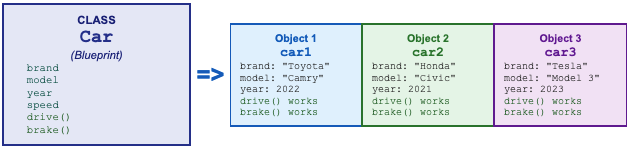
One Car class definition creates the blueprint. Every time we write new Car(...) we get a brand new object that follows that blueprint but holds it own unique data.
Class syntax

// Define the class (blueprint)
class Cricketer {
  constructor(name, role) {
    this.name = name;
    this.role = role;
    this.matchesPlayed = 0;
    this.stamina = 100;
  }

  // A method - something the cricketer can DO
  introduce() {
    return `\({this.name} the \){this.role} | matchesPlayed: \({this.matchesPlayed} | stamina: \){this.stamina} `;
  }
}

//Create objects from the class
const player1 = new Cricketer("Virat", "Batsman");
const player2 = new Cricketer("Bumrah", "Bowler");

console.log(player1.introduce()); //Virat the Batsman | matchesPlayed: 0 | stamina: 100
console.log(player2.introduce()); //Bumrah the Bowler | matchesPlayed: 0 | stamina: 100
The Constructor Method
The constructor is a special method inside a class that runs automatically every time we create a new object with keyword new. Its job is to set up the object's initial values.
Role | Code | What it does |
Special method | constructor( ... ) { ... } | Runs automatically when 'new ClassName()' is called |
Parameters | constructor(name, age) | Values passed in from outside when creating object |
this.property | this.name = name; | 'this' refers to the new object being created |
Stores value | this.age = age; | Saves the passed value as a property of the object |
Called with new | new Person('Alice', 25) | Each call creates a SEPARATE object with its own values |
constructor with a Person example
class Person {
    constructor(name, age) {
        this.name = name; //store name on this object
        this.age = age;   //store age on this object
    }
}

const alice = new Person('Alice', 25);
const bob = new Person('Bob', 30);

console.log(alice.name);  // Alice
console.log(alice.age);   // 25
console.log(bob.name);    // Bob
console.log(bob.age);     // 30
What does 'this' mean?
Inside a class, this is a special keyword that refers to the specific object being created. Each time we call new Person(), a fresh object is made, and this points to that new object:
When we call... | 'this' points to... | So values stored are... |
new Student("Alice", 20) | student1 object | this.name='Alice', this.age=20 |
new Student("Bob", 25) | student2 object | this.name='Bob', this.age=25 |
new Student("Carol", 22) | student3 object | this.name='Carol', this.age=22 |
class Person {
  constructor(name, age) {
    this.name = name;  // 'this' = the new object being built right now
    this.age  = age;
  }
}


const p1 = new Person('Alice', 25);   // this = p1
const p2 = new Person('Bob',   30);   // this = p2
const p3 = new Person('Carol', 22);   // this = p3


// Each object has its OWN data
console.log(p1.name);   // Alice
console.log(p2.name);   // Bob
console.log(p3.name);   // Carol
Key rule about 'this'
Every time we access a property inside a class, we must use 'this.' in front of it. Without 'this', JavaScript cannot find the property and will throw ReferenceError.
Methods Inside a Class
A Methods is a function defined inside a class that an object can perform. Methods can read the object's own properties using this, and can return values or produce output.
class Person {
  constructor(name, age) {
    this.name = name;
    this.age  = age;
  }


  // Method 1 - greet the user
  greet() {
    return 'Hello! My name is ' + this.name + '.';
  }


  // Method 2 - calculate birth year
  getBirthYear() {
    return 2025 - this.age;
  }


  // Method 3 - print full summary
  introduce() {
    return this.name + ' is ' + this.age + ' years old.';
  }
}


const alice = new Person('Alice', 25);
const bob   = new Person('Bob', 30);


console.log(alice.greet());         // Hello! My name is Alice.
console.log(alice.getBirthYear());  // 2000
console.log(bob.introduce());       // Bob is 30 years old.
Class - Instance relationship with methods

Every object is created from the class automatically has access to all the methods defined in that class. We don't need to rewrite the method - it lives in the class, and every object gets it for free.
A Complete Class
class Car {
  constructor(brand, model, year) {
    this.brand = brand;
    this.model = model;
    this.year  = year;
    this.speed = 0;       // always starts at rest
  }


  // Accelerate the car
  accelerate(amount) {
    this.speed = this.speed + amount;
    return this.brand + ' accelerated to ' + this.speed + ' km/h';
  }


  // Brake the car
  brake(amount) {
    this.speed = Math.max(0, this.speed - amount);
    return this.brand + ' slowed to ' + this.speed + ' km/h';
  }


  // Full description
  describe() {
    return this.year + ' ' + this.brand + ' ' + this.model;
  }
}


// Create two completely independent car objects
const car1 = new Car('Toyota', 'Camry', 2022);
const car2 = new Car('Honda',  'Civic', 2021);


console.log(car1.describe());         // 2022 Toyota Camry
console.log(car1.accelerate(60));     // Toyota accelerated to 60 km/h
console.log(car1.brake(20));          // Toyota slowed to 40 km/h


console.log(car2.describe());         // 2021 Honda Civic
console.log(car2.accelerate(80));     // Honda accelerated to 80 km/h


// Each car has its OWN speed - they don't interfere!
console.log(car1.speed);  // 40
console.log(car2.speed);  // 80
Each object is independent
car1 and car2 are completely separate. Accelerating car1 does not affect car2 at all. Each object has its own copy of all properties (brand, model, speed) but shares the class methods (accelerate, brake, describe)
Encapsulation - Building Data and Behaviour
Encapsulation is the OOP principle of keeping related data and methods together inside one class, and hiding the internal details from the outside world.
Instead of having dozens of scattered variables and functions all over our code, we wrap everything that belongs together inside a class. This keeps our code tidy, safe and easy to understand.
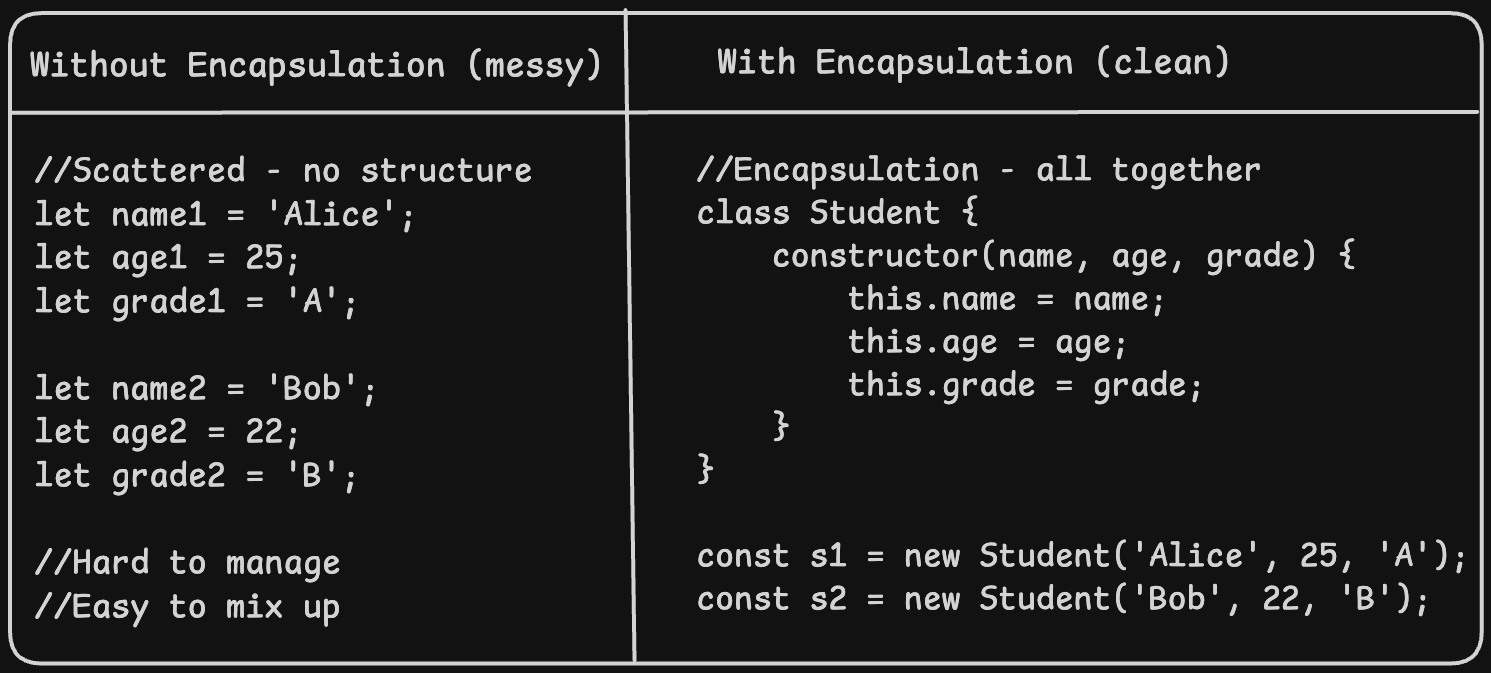
Real encapsulation example - Bank account
The balance is private data - we should not be able to directly set it to any value. Instead, we interact through controlled methods like deposit() and withdraw():
class BankAccount {
    constructor(owner, initialBalance) {
        this.owner = owner;
        this.balance = initialBalance;
    }

    deposit(amount) {
        if(amount > 0) {
            this.balance = this.balance + amount;
            return 'Deposited' + amount + ' New Balance:' + this.balance;
        }
        return 'Invalid deposit amount.';
    }

    withdraw(amount) {
        if(amount > this.balance) {
            return 'Insufficient Funds!';
        }
        this.balance = this.balance - amount;
        return 'Withdrew ' + amount + 'New Balance: ' + this.balance;
    }

    getBalance() {
        return this.owner + "'s balance: " + this.balance;
    }
}

const account = new BankAccount('Alice', 1000);
console.log(account.deposit(500));     // Deposited 500. New balance: 1500
console.log(account.withdraw(200));    // Withdrew 200. New balance: 1300
console.log(account.withdraw(2000));   // Insufficient funds!
console.log(account.getBalance());     // Alice's balance: 1300
Encapsulation benefit
The balance can only be changed through deposit() and withdraw(). These methods contain validation logic ( no -ve deposits) This protects the data form being accidentally or maliciously corrupted from outside.
Code Reusability - One Class, Many Objects
The most powerful advantage of OOP is reusability. We define a class once, and then create as many objects from it as we need. Each object is completely independent.
class Student {
  constructor(name, age, grade) {
    this.name  = name;
    this.age   = age;
    this.grade = grade;
  }


  introduce() {
    return 'I am ' + this.name + ', aged ' + this.age + ', grade: ' + this.grade;
  }


  isPassing() {
    return this.grade !== 'F';
  }
}


// Create MANY students from the same class
const students = [
  new Student('Riya',   20, 'A'),
  new Student('Arjun',  22, 'B'),
  new Student('Priya',  21, 'A'),
  new Student('Rohan',  23, 'C'),
  new Student('Aisha',  20, 'F'),
];


// Print all students
students.forEach(s => console.log(s.introduce()));


// Find passing students only
const passing = students.filter(s => s.isPassing());
console.log('Passing students: ' + passing.length);  // 4


// Combine OOP with array methods - very powerful!
passing.forEach(s => console.log(s.name + ' passed!'));
OOP + Array methods = powerful combination
Because each Student object has the same shape, you can store them in an array and use map(), filter(), and forEach() with arrow functions. This is a pattern used constantly in real JavaScript applications and frameworks like React.
Practice Assignment
Task 1 - Create a Student class
class Student {
    constructor(name, age) {
        this.name = name;
        this.age = age;
    }
}
Task 2 - Add a method to print student details
class Student {
    constructor(name, age) {
        this.name = name;
        this.age = age;
    }

    //Method to display student info
    printDetails() {
        console.log('Name: ' + this.name + ', Age: ' + this.age);
    }
}
Task 3 - Create multiple student objects and call the method
const student1 = new Student('Alice', 20);
const student2 = new Student('Bob',   22);
const student3 = new Student('Carol', 21);


student1.printDetails();   // Name: Alice, Age: 20
student2.printDetails();   // Name: Bob,   Age: 22
student3.printDetails();   // Name: Carol, Age: 21
Task 4 - Extend the class with more features
class Student {
  constructor(name, age, subject) {
    this.name    = name;
    this.age     = age;
    this.subject = subject;
    this.marks   = [];    // empty array for marks
  }


  addMark(mark) {
    this.marks.push(mark);
  }


  getAverage() {
    const total = this.marks.reduce((sum, m) => sum + m, 0);
    return total / this.marks.length;
  }


  printDetails() {
    console.log(this.name + ' (' + this.subject + ') - Average: ' + this.getAverage());
  }
}


const s1 = new Student('Riya', 20, 'Maths');
s1.addMark(85);
s1.addMark(90);
s1.addMark(78);
s1.printDetails();   // Riya (Maths) - Average: 84.33...
Conclusion
Here is everything you learned in this article:
OOP is a programming style that organises code around objects - things with data and behaviour
The four pillars of OOP are: Encapsulation, Inheritance, Polymorphism, and Abstraction
A class is a blueprint - define it once, create as many objects from it as needed
A constructor method runs automatically when you create a new object with new
this inside a class refers to the specific object being created at that moment
Methods are functions inside a class - objects call them using dot notation: object.method()
Encapsulation bundles data and methods together, protecting data through controlled access
One class → many independent objects - the foundation of code reusability
Combining OOP with map(), filter(), forEach() is a pattern used in every modern JavaScript application
About the author
- the topics and concepts which i learn and get more fascinated i write about them here...
Comments
Join the discussionNo comments yet. Be the first to comment.