Function Declaration vs Function Expression

What's the Difference
Syntax | Hoisting | Arrow Functions | When to Use Which
What is a Function and Why do we Need one?
Imagine we are making a cup of tea. Every morning we do the same steps, boil water, add tea, add milk, stir and pour. Instead of thinking through each step from scratch every time, our brain has memorized the whole process and can run it on demand.
That is exactly what a function is in programming: a reusable block of code that we write once and can run (call) as many times as we like, from anywhere in our program.
A function is like a recipe.. We write once. Every time we want the dish, we follow the recipe where we don't rewrite it. In JavaScript, 'calling a function' means running its recipe.
Without functions, we would have to repeat the same code every time we need it:
// WITHOUT a function - repetition everywhere
console.log(3 + 5);   // 8
console.log(10 + 5);  // 15
console.log(7 + 5);   // 12


// WITH a function - write once, use everywhere
function add(a, b) {
  return a + b;
}


console.log(add(3, 5));   // 8
console.log(add(10, 5));  // 15
console.log(add(7, 5));   // 12
The function add now does the work. If the logic ever changes, we update the one place instead of every place we used it.
Function Declaration
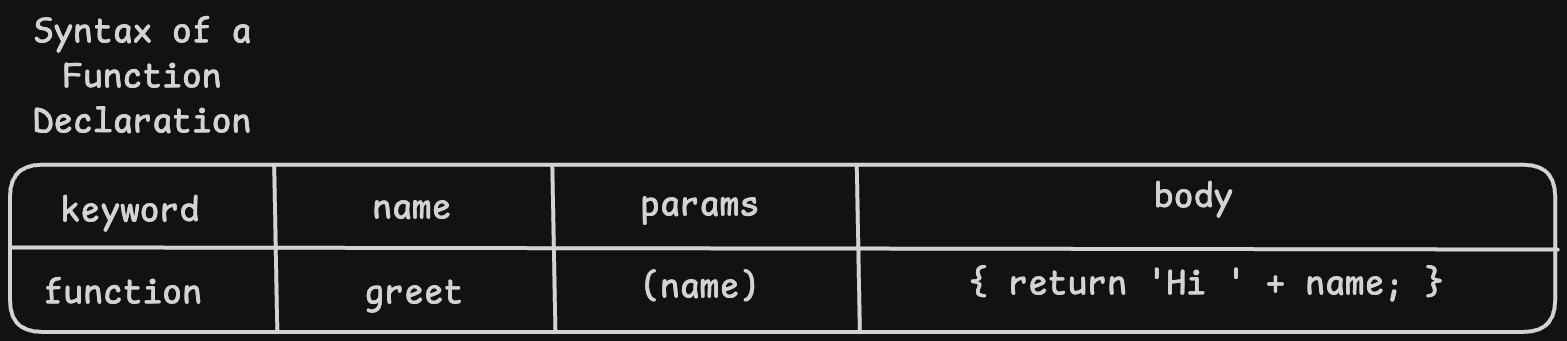
A function declaration is the traditional, classic way to define a function in JavaScript. We start directly with the function keyword.
Syntax of Function Declaration
Basic Syntax
function functionName(parameter1, parameter2) {
  // code to run
  return result;
}
Simple examples
// Add two numbers
function add(a, b) {
  return a + b;
}
console.log(add(3, 7));    // 10


// Greet a user
function greet(name) {
  return 'Hello, ' + name + '!';
}
console.log(greet('Alice'));  // Hello, Alice!


// Check if number is even
function isEven(num) {
  return num % 2 === 0;
}
console.log(isEven(4));    // true
console.log(isEven(7));    // false
Function call execution flow
When we write add(3, 5), here is exactly what happens step by step:

Function Expression
A function expression stores a function inside a variable. Instead of starting with function, we start with const (or let) and then assign an anonymous function to it.
Basic Syntax
const functionName = function(parameter1, parameter2) {
  // code to run
  return result;
};   // <-- semicolon here because it is a variable assignment
Different Syntax
// Add two numbers
const add = function(a, b) {
  return a + b;
};
console.log(add(3, 7));    // 10


// Greet a user
const greet = function(name) {
  return 'Hello, ' + name + '!';
};
console.log(greet('Alice'));  // Hello, Alice!
Arrow Function - the modern shorthand for expressions
Modern JavaScript introduced arrow functions - a shorter way to write function expressions. They are extremely common in read-world code.
// Traditional function expression
const add = function(a, b) {
  return a + b;
};


// Arrow function - exactly the same thing, shorter
const add = (a, b) => {
  return a + b;
};


// Even shorter - when body is a single expression
const add = (a, b) => a + b;


console.log(add(3, 7));   // 10
Evolution of the same function - four forms

Declaration vs Expression
Lets compare these both side by side so that we clear our doubts
| Function Declaration | Function Expression |
|---|---|
| // Declaration | |
| function add(a, b) { | |
| return a + b; | |
| } |
console.log(add(3, 5));
// 8 | // Expression
const add = function(a, b) {
return a + b;
);
console.log(add(3,5));
// 8 |
The Key observation
Both the versions produce a function that does exactly the same thing. The difference is HOW we write it and WHERE JavaScript stores it, which leads to the most important difference which is hoisting.
Hoisting
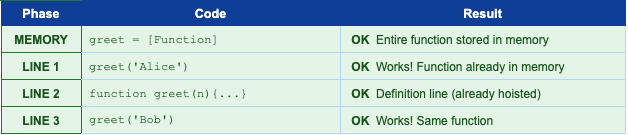
Hoisting in JavaScript's behaviour of scanning the entire code file before running it and moving certain things to the top of memory. The word 'hoist' means to lift something up - JavaScript lifts function declarations to the very top.
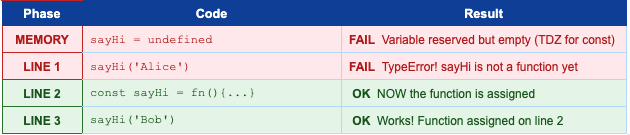
Imagine we are building a house> before we start, we make a complete list of all materials we need and put them in the warehouse. That is the MEMORY PHASE. Function declarations go into warehouse complete - ready to use immediately. Function expressions only put a label in warehouse. The actual function is not there yet until JavaScript reaches that line of code.
Function Declaration - Hoisted Fully
When we call a function declaration before the line where we define it. JavaScript already has the whole function in the memory.
// Call BEFORE the definition
console.log(greet('Alice'));  // Hello, Alice!  -- works perfectly!


// Definition comes later in the file
function greet(name) {
  return 'Hello, ' + name + '!';
}

// Call AFTER the definition
console.log(greet('Bob'));    // Hello, Bob!  -- also works
Function Expression - Not Hoisted
With a function expression, calling the function before the line where it is assigned causes an error - the variable exists but has no function value yet.
// Try to call BEFORE the definition
console.log(sayHi('Alice'));  // TypeError: sayHi is not a function


// Definition comes here
const sayHi = function(name) {
  return 'Hi, ' + name + '!';
};


// Call AFTER the definition
console.log(sayHi('Bob'));    // Hi, Bob!  -- works fine
Comparison between both
Feature | Function Declaration | Function Expression |
Syntax starts with | function keyword first | const/let/var keyword first |
Has a name? | Yes, name is required | Optional (can be anonymous) |
Hoisted? | YES, fully hoisted | NO, only variable is hoisted |
Call before defining? | YES, works fine | NO, gives TypeError/undefined |
Stored in variable? | No, standalone statement | Yes, stored in a variable |
Arrow function version? | Not applicable | Yes - const fn = () => {} |
Best used for | Named, reusable utility functions | Callbacks, conditionals, closures |
When to use Each Type
Use Function Declaration when... | Use Function Expression when... |
Named utility functions used everywhere | Assigning a function to a variable |
When you want hoisting (call anywhere) | Callbacks passed to map/filter/forEach |
Top-level named functions in a module | Conditionally creating a function |
Functions you need before their definition | Short arrow function alternatives |
Public API functions of a class/module | Event handlers stored in variables |
Summary
Function Declaration | Function Expression | |
Starts with | function keyword | variable keyword (const/let) |
Syntax | function name(p){ } | const name = function(p){ } |
Arrow version | N/A | const name = (p) => { } |
Hoisting | Fully hoisted | Variable hoisted, value NOT |
Call before declare? | YES | NO - TypeError or undefined |
Named or anonymous? | Always named | Can be anonymous |
Use as callback? | Yes (pass by name) | Yes (inline or stored) |
Practice Assignment
Task 1 - Write a function declaration that multiples 2 numbers
function multiply(a, b){
    return a * b;
}

console.log(multiply(4, 5));   // 20
console.log(multiply(3, 7));   // 21
Task 2 - Write the same logic as a function expression
const multiply = function (a, b){
    return a * b;
};

console.log(multiply(4, 5));   // 20
console.log(multiply(3, 7));   // 21
Task 3 - Rewrite Task 2 as an arrow function
const multiply = (a, b) => a * b;
console.log(multiply(4, 5));   // 20
console.log(multiply(3, 7));   // 21
Task 4 - Observer hoisting behaviour
// PART A - call BEFORE declaration (should work)
console.log(multiply(6, 6));   // 36   --no error

function multiply(a, b){
    return a * b;
}

// PART B - call BEFORE expression

console.log(multiplyExpr(6, 6));   // TypeError!

const multiplyExpr = function(a, b) {
    return a * b;
};

console.log(multiplyExpr(6, 6));   // 36 -- works after definition
Conclusion
Here is everything you learned in this article:
Functions are reusable blocks of code - write once, call anywhere
Function Declaration: starts with function keyword - fully hoisted, can be called before its definition
Function Expression: stored in a variable - NOT hoisted, must be defined before calling
Arrow functions are the modern shorthand for expressions: const fn = (a, b) => a + b
Hoisting means JavaScript moves declarations to memory before running - like a preparation phase
Use declarations for named utility functions you want to call anywhere in a file
Use expressions for callbacks, conditional functions, or when storing functions in variables
Both produce working functions - the key difference is hoisting and syntax style
Understanding this will help us know more about how exactly functions are written. In the next article we will discuss more about how exactly arrow functions are written and where do we use them.


