My Laptop Was in India, My Server Was in UTC, and My Bookings Were in Yesterday
A real timezone bug from a production booking platform: how I found it, how I debugged it, how I fixed it, and whether my fix was the right one

So i've been building a revamp version of Gtribe 2.0. Its an adventure tourism company. they run treks, camps, corporate outings and school programs. They also sell trekking gear. So, i'm rebuilding everything into one platform, trek booking, gear store, Razorpay payments, coupons, Whatsapp updates and an admin dashboard where the team can see how the business is doing.
Here is the stack, because it matters for this story.
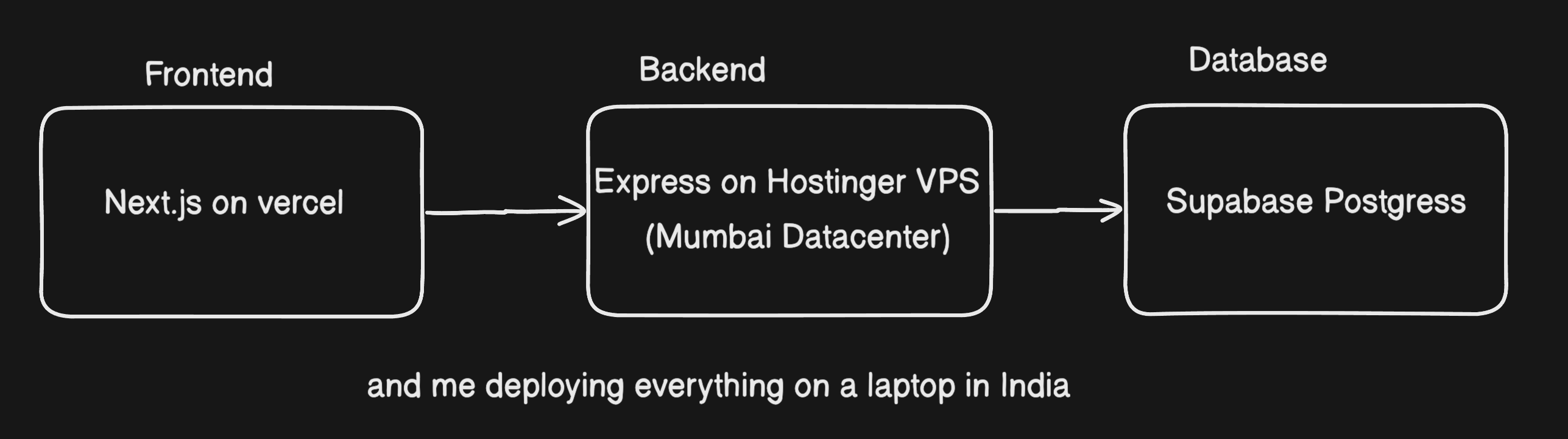
That's the four place where the code runs, and it turns out they didnt all agree on what time it was.
This post covers a bug that took me longer to understand than to fix. i'll go through how i noticed, how i tracked down, then what i changed, and then i kept thinking that was my fix actually right way to do it, or where there any other options?
The day the numbers didn't add up
Everything about Gtribe happens in India time. A trekker books at 11PM after dinner, a coupon is valid till 31st Oct, a trek on 10th oct. Nobody at Gtribe thinks in UTC.
Once the admin dashboard was mostly built, and I did what I should always do, I checked it against the raw data. I picked one day in September and counted the bookings myself straight from the database.
Dashboard Said: 7 bookings
I counted: 11 bookings
Four bookings were missing, My first worry was that payments were failing, or a webhook was silently dropping records. That would have been a much scarier bug.
But the four bookings were right in the table, paid and confirmed. they hadnt been lost. They had been counted under the wrong day.
Debugging: what did the "missing" bookings have in common?
I pulled the four bookings out and put them next to each other. What stood out wasn't the user, the trek or the amount. It was the time:
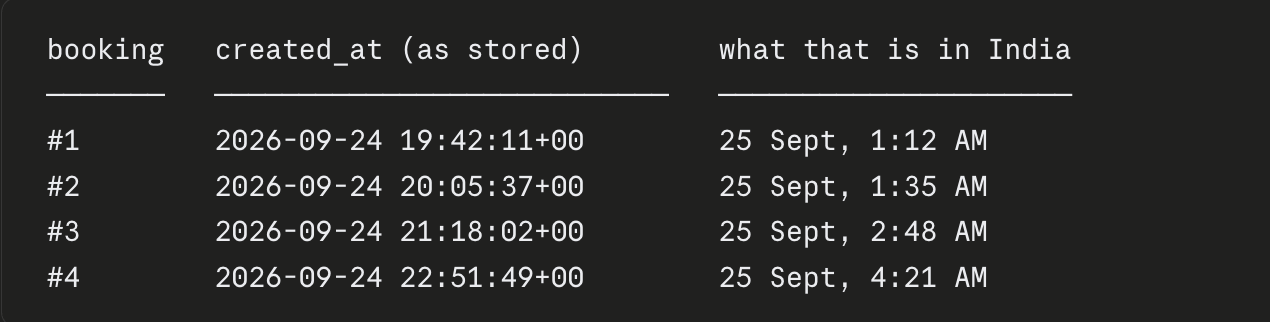
Every one of them was made between midnight and 5:30 AM India time, and in the database every one of them said 24 Sept.
That was the clue. The number 5:30 is exactly India's offset from UTC (UTC+5:30). Something was deciding which day a booking belonged to using UTC instead of India time.
Then the next question hit me: why had I never seen this while developing? I'd been testing the dashboard for weeks.
The answer was my laptop.
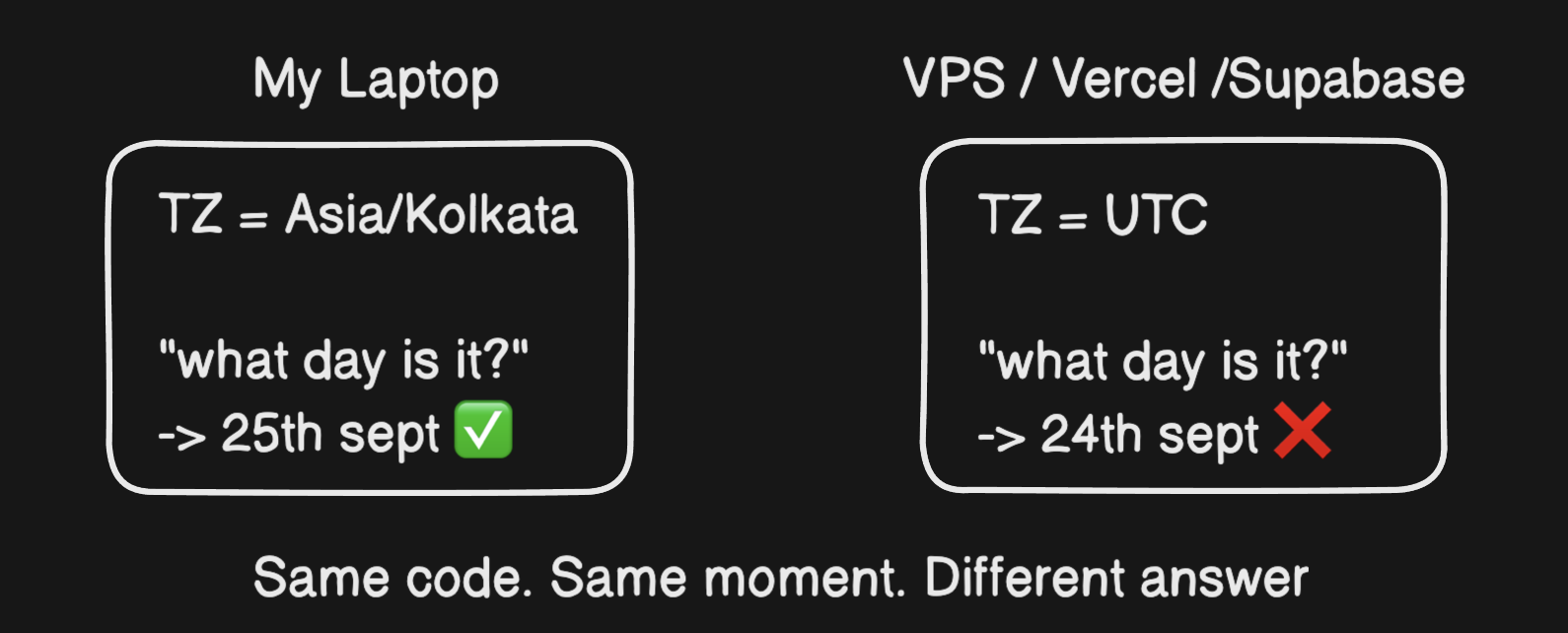
My laptop is set to India time, so every date calculation came out right on my machine. Vercel's servers run on UTC. Supabase's Postgres runs on UTC. Even my VPS, which physically sits in a Mumbai datacentre, was running on UTC, because that's the default for almost every cloud server image. (Run timedatectl on yours and check.)
A server's location tells you nothing about its timezone.
To confirm the theory, I ran the app locally while pretending to be a server:
TZ=UTC pnpm dev
The dashboard immediately showed the same wrong number as production. The bug was reproducible on my machine, and I knew exactly what caused it.
The concept I had been ignoring, a moment is not a date
A database stores time as a moment, a single point on the global timeline:
2026-09-24T19:42:11Z
That Z means UTC. The moment is the same everywhere on Earth. When it's 7:42 PM in London, it's 1:12 AM the next day in Pune. Same instant, different clocks.
A date like "25 September" isn't a point. It's a 24-hour window, and where that window starts and ends depends on where you're standing.
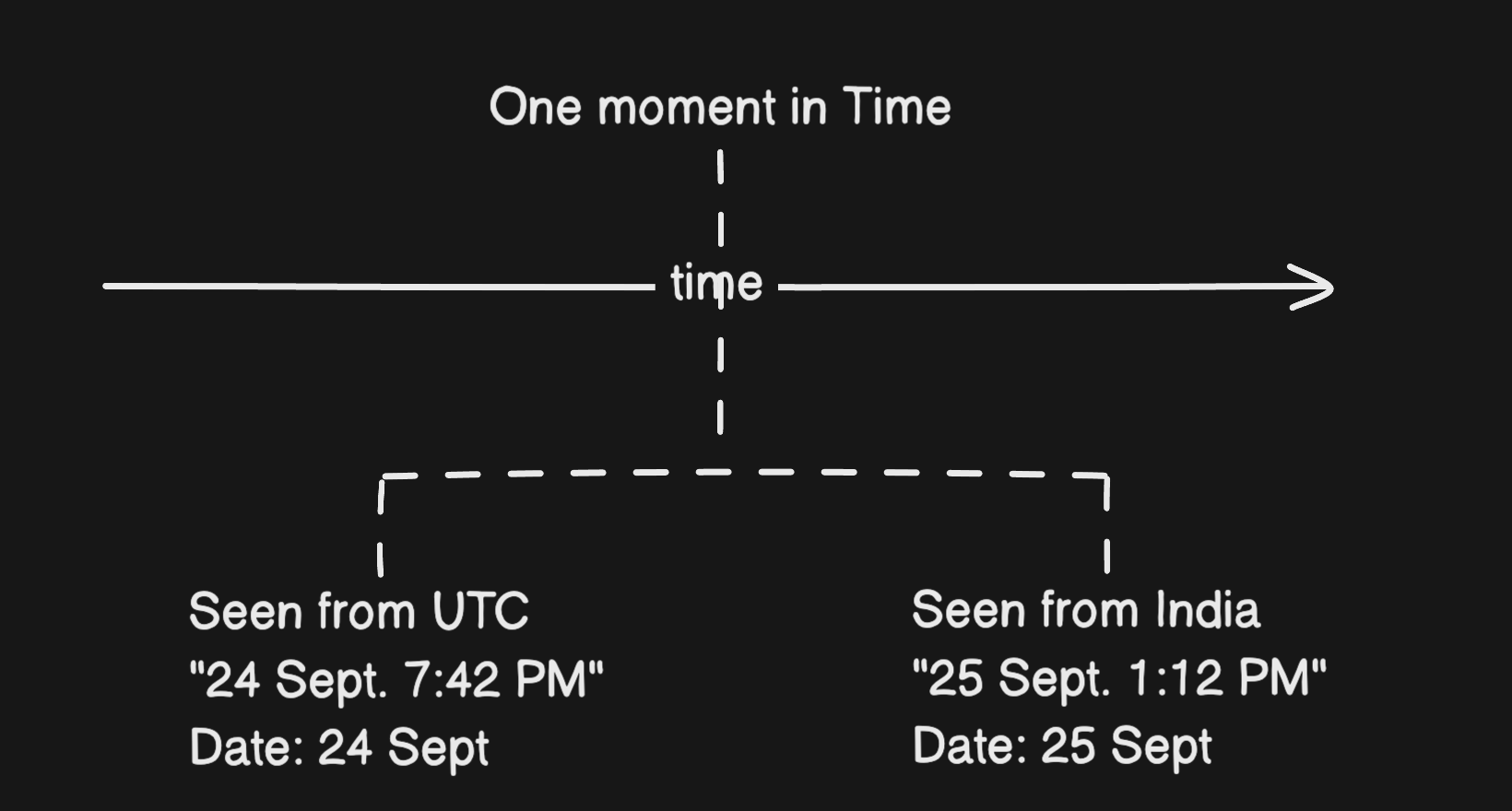
So "what day did this booking happen?" has no answer until you say where. If your code doesn't say where, the machine running it decides for you.
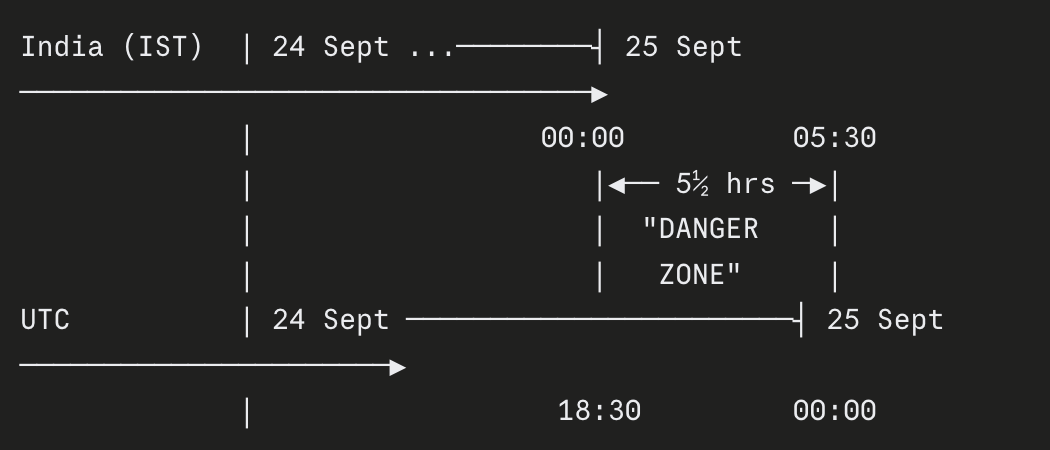
Because India is 5½ hours ahead, the two calendars disagree for the first 5½ hours of every single Indian day:
| India time | UTC time | Date in India | Date in UTC |
|---|---|---|---|
| 25 Sept, 12:30 AM | 24 Sept, 7:00 PM | 25 Sept | 24 Sept |
| 25 Sept, 5:29 AM | 24 Sept, 11:59 PM | 25 Sept | 24 Sept |
| 25 Sept, 5:30 AM | 25 Sept, 12:00 AM | 25 Sept | 25 Sept |
Once I understood this, I stopped looking only at the dashboard. I searched the codebase for every place a moment was being turned into a day. I found four bugs, all with the same cause.
The four bugs:
Bug 1: Revenue counted on the wrong way
The dashboard grouped bookings by day like this:
date_trunc('day', created_at)
The Postgres session via Supabase runs in UTC, so this cut the timeline at UTC midnight, which is 5:30 AM in India. A booking at 1 AM IST on the 25th went into the 24th's bucket.
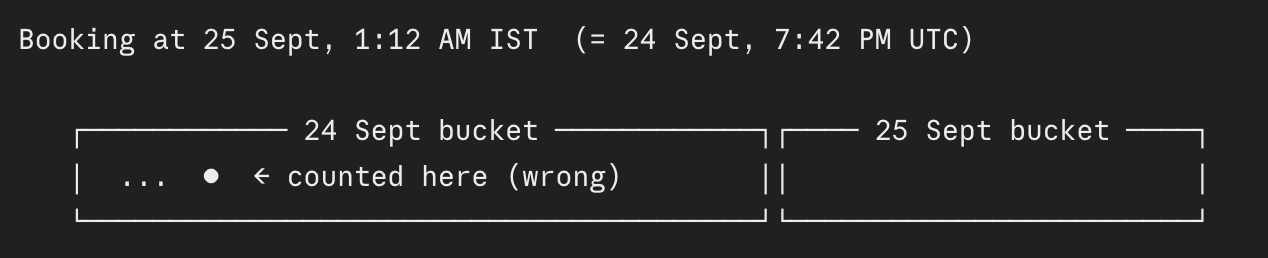
When I checked the whole table, about half of our test bookings had been made between midnight and 5:30 AM. That's what happens when you test at night. "Today", "This Month" and every revenue chart were skewed.
Bug 2: Coupons that expired at breakfast
When an admin picked "31 Oct" as a coupon's expiry date, my code did this:
new Date("2026-10-31") // → 2026-10-31T00:00:00Z
This one genuinely surprised me. In JavaScript, a date-only string (YYYY-MM-DD with no time) is parsed as midnight UTC, which is 5:30 AM in India.
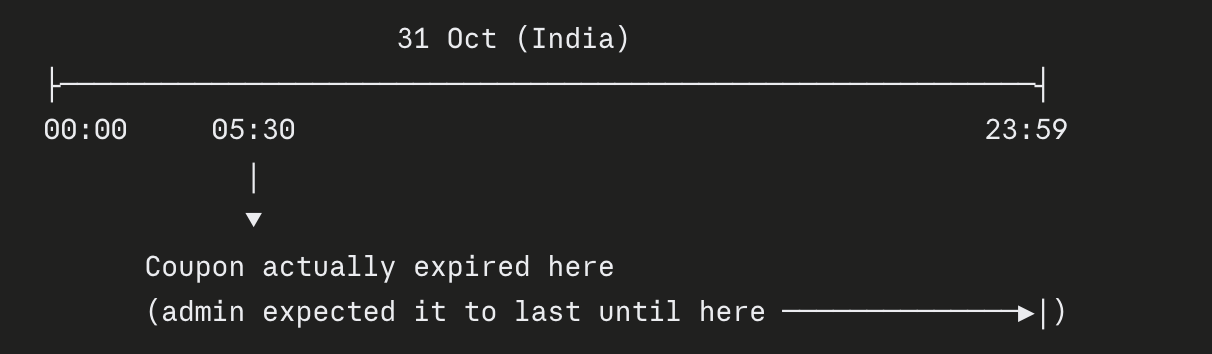
A coupon "valid till 31 Oct" stopped working at 5:30 AM on 31 Oct. Anyone trying it that morning would be told it had expired.
Bug 3: The same date showing differently on different screens
I had code like this copy-pasted across the app:
new Date(iso).toLocaleDateString("en-IN")
I'd assumed "en-IN" meant "show this in Indian time". It doesn't. It only controls the format (day before month, and so on). The timezone still comes from whichever machine runs the code.
With Next.js, that can be two different machines for the same page:
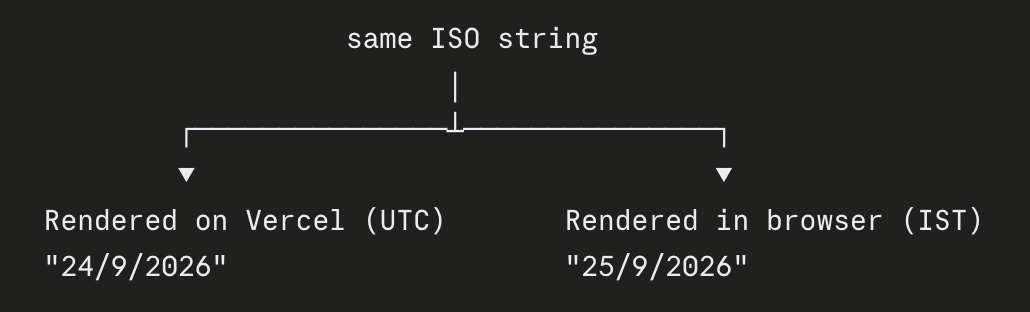
So a blog post could show as published on two different days depending on where it was rendered.
Bug 4: Treks vanishing on the morning of the trek
Trek dates were saved as midnight UTC, and the homepage hid any event whose end time had passed. A one-day trek on 10 October "ended" at 2026-10-10T00:00:00Z, which is 5:30 AM IST on 10 October.
The trek would disappear from the website on the morning it was actually happening, while trekkers were probably sharing the link in their WhatsApp group.
How I fixed it
My first instinct was "just make everything India time". I didn't do that, and I'll explain why in the next section.
Storing moments in UTC wasn't the problem. Postgres, Vercel and almost every library expect it. The problem was the places where I turned a moment into a day without saying which day I meant. So I adopted one rule:
Store in UTC. Every time a moment becomes a day, say "in India" explicitly.
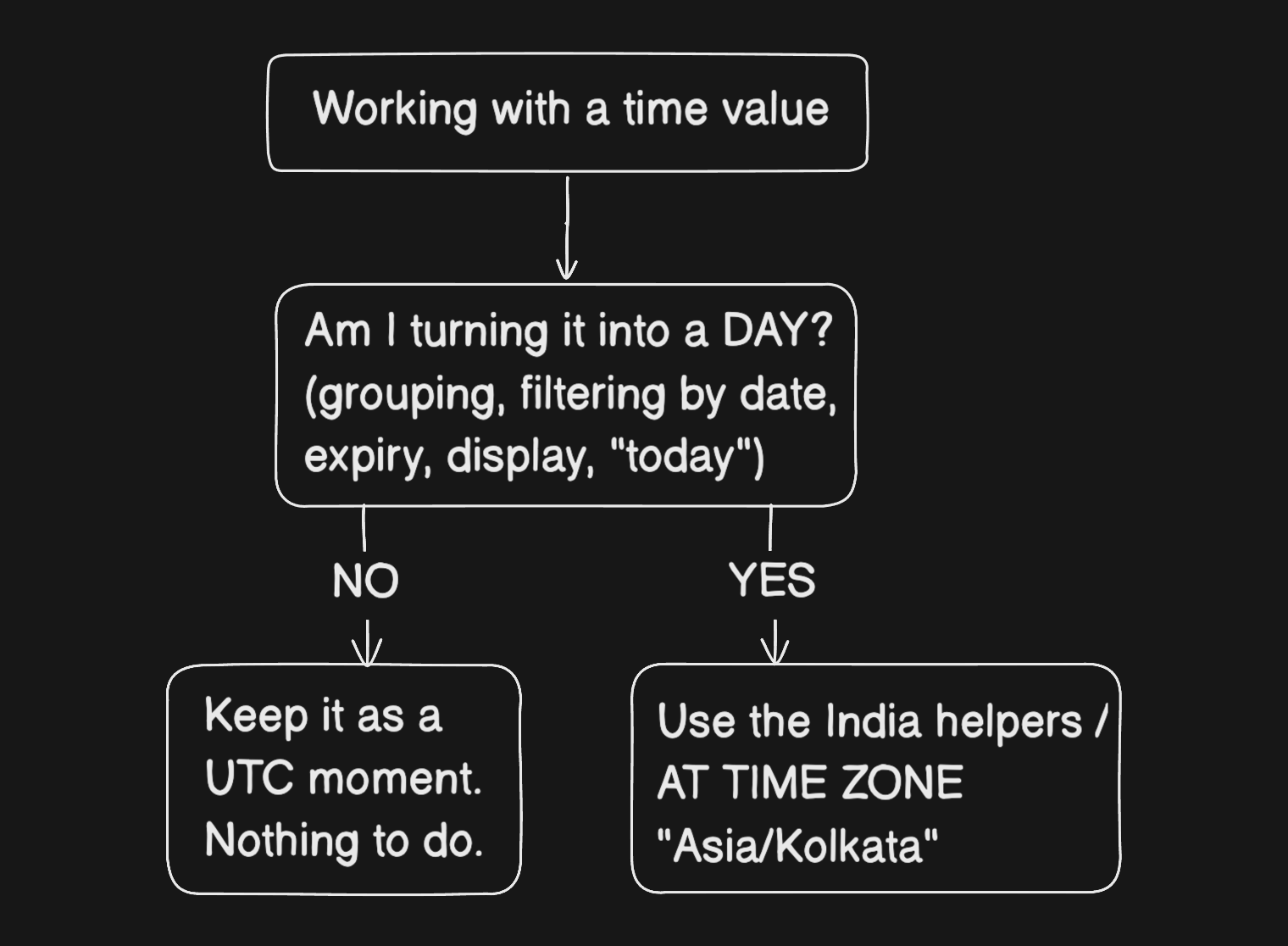
One set of helpers instead of twelve copy-pasted snippets
I put these in the shared package so the frontend and backend both use them:
export const INDIA_TIME_ZONE = "Asia/Kolkata";

// The first and last moment of an Indian calendar day
export function indiaDayStart(date: string) {
  return new Date(`${date}T00:00:00.000+05:30`);
}
export function indiaDayEnd(date: string) {
  return new Date(`${date}T23:59:59.999+05:30`);
}

// Display a date as India sees it, wherever the code runs
export function formatIndiaDate(value: string | Date) {
  return new Date(value).toLocaleDateString("en-IN", {
    day: "numeric",
    month: "short",
    year: "numeric",
    timeZone: INDIA_TIME_ZONE,
  });
}
The +05:30 written into the string is the important part. It tells JavaScript exactly which midnight I mean, so the machine's timezone has nothing left to decide.
💡 Is hardcoding
+05:30safe? For India, yes: there's no daylight saving time, so the offset never changes. If you're building for the US, UK or most of Europe, don't hardcode offsets. Their offsets change twice a year, so use a timezone-aware library (more on that below).
What changes for each bug
Dashboard: Date filters now run from India midnight to India midnight, and Postgres groups by India's calendar:
date_trunc('day', created_at AT TIME ZONE 'Asia/Kolkata')
AT TIME ZONE converts the UTC moment into India's wall-clock time before cutting it into days. The day that showed 7 bookings now shows 11.
Coupons. An expiry date now means "valid through the end of that day in India" (11:59:59 PM IST, via indiaDayEnd()). I also ran a one-off migration to move existing coupons onto the same rule.
Before: 31 Oct ├──05:30✗───────────────────────────────┤ After: 31 Oct ├───────────────────────────────23:59:59✓┤
Dates on screen. About a dozen copy-pasted formatters were replaced with formatIndiaDate, so a date looks the same whether Vercel or a browser renders it.
Upcoming treks. I stopped hiding events by date altogether. A trek stays listed until GTribe's staff mark it completed. That's how the business actually works: a trek is over when the team says it's over, not when a timestamp passes.
Checking what was already right
Not everything was broken. Booking IDs like GTB09260001 (September '26, first booking of the month) and invoice numbers (which reset with India's financial year on 1 April) had been built on India time from the start.
"It looks right" isn't proof, so I tested them with the clock forced to UTC, at exactly the moments where the two calendars disagree:
| Moment (IST) | Same moment in UTC | Expected | Result |
|---|---|---|---|
| 1 Oct, 12:01 AM | 30 Sept, 6:31 PM | New October booking series | ✅ |
| 1 Apr, 12:30 AM | 31 Mar, 7:00 PM | New financial year for invoices | ✅ |
Was this the right way to fix it? The other options
After fixing it, I wanted to know whether I'd solved it properly or just patched it. Here are the approaches I looked at.
Option 1: Set every server's timezone to India
This was my first instinct: set TZ=Asia/Kolkata on the VPS, change the Postgres timezone, and the bugs go away.
Laptop ✅ IST VPS ✅ IST Postgres ✅ IST Vercel ❓ ...
Why I didn't do it:
I don't control every machine. Vercel's serverless functions run in UTC, and as far as I know you can't change that by setting
TZthere (it's a reserved variable). One environment out of four is enough to bring the bugs back.Pooled database connections make it fragile. We connect to Supabase through Supavisor in transaction mode. A
SET TIME ZONEon a session isn't reliable there because each transaction can land on a different connection. You'd have to set it at the database or role level instead.It hides the problem instead of fixing it. The code would still be saying "use whatever timezone the machine has". It would just be correct by accident. A new server, a new region or a Docker image with default settings breaks it again, silently.
Option 2: Store UTC, convert at the edges (what I did)
Keep every moment in UTC. Convert to India time only at the boundaries: when grouping, filtering, checking expiry or displaying.
Pros: works regardless of where code runs; it's the standard approach most backend engineers will recommend; it scales if GTribe ever serves users in another timezone. Cons: you have to remember to use the helpers. That's why centralising them matters: one place to get it right, instead of twelve places to get it wrong.
Verdict: this is the correct default for moments — things that happened at a specific instant, like a payment or a booking.
Option 3: Use a real date type for things that are actually dates
Looking back, this is the one I'd consider more seriously next time.
Some things in GTribe are not moments at all. "The trek is on 10 October" or "this coupon is valid till 31 October" are calendar dates. Nobody means "10 October at 00:00:00.000 UTC".
Postgres has a date column type for exactly this. It stores 2026-10-10 with no time and no timezone, so there's nothing to shift:
-- a moment: when something happened
created_at   timestamptz   -- 2026-09-24 19:42:11+00

-- a calendar date: a day on India's calendar
trek_date    date          -- 2026-10-10
valid_until  date          -- 2026-10-31
You still need India time for one thing: knowing what today is when comparing (valid_until >= today in India). But the stored value can't drift.
Verdict: arguably more correct for trek dates and coupon expiries. My end-of-day-timestamp approach works fine for GTribe, but if I were designing the schema from scratch, I'd use date for these.
Option 4: Use a date library (or Temporal)
Libraries like date-fns with its timezone add-on, Luxon or Day.js with the timezone plugin all handle timezone conversion for you, including daylight saving for countries that have it.
There's also Temporal, a new built-in JavaScript date API designed to fix exactly this class of bug. It has separate types for "a moment" (Temporal.Instant) and "a calendar date with no time" (Temporal.PlainDate), so you can't mix them up by accident. Browser and runtime support is still rolling out, so check compatibility or use a polyfill.
Verdict: for a single-timezone app with no daylight saving, my three small helpers were enough. If GTribe ever goes multi-country, I'd switch to a library rather than grow the helpers.
Option 5: Store each user's timezone
Big global apps (calendars, airline booking) store a timezone per user and convert per person.
Verdict: overkill for a Pune trekking company where every customer, trek and coupon lives on India's calendar. It's worth knowing about, though.
Summary
| Approach | Fixes the cause? | Survives new servers? | Good for GTribe? |
|---|---|---|---|
| Set server TZ to IST | ❌ hides it | ❌ | Only as a safety net |
| Store UTC, convert at edges | ✅ | ✅ | ✅ what I did |
date column for calendar dates |
✅ | ✅ | ✅ better for trek/coupon dates |
| Date library / Temporal | ✅ | ✅ | When going multi-timezone |
| Per-user timezone | ✅ | ✅ | Overkill for now |
So my fix for this use case was correct, but not the only correct answer. For moments, "store UTC, convert at the edges" is right. For things that are really calendar dates, a date column is cleaner.
What I learned
Moments and dates are different things. Store moments in UTC. The instant you turn one into a day, pick a timezone on purpose.
A server's location tells you nothing about its timezone. My VPS is in Mumbai and still ran on UTC.
"Works on my machine" can be a timezone bug. My laptop was in IST; production wasn't.
TZ=UTC pnpm devwould have caught this weeks earlier.new Date("2026-10-31")is midnight UTC. In India, that's 5:30 AM, which is almost never what you meant."en-IN"sets the format, not the timezone. PasstimeZoneexplicitly.Centralise date logic. One set of helpers beats twelve copy-pasted snippets.
Test the 5½-hour window. Midnight to 5:30 AM IST is where every one of these bugs lived.
If you're building for Indian users, try this right now: search your codebase for new Date(" and toLocaleDateString(, then run your app with TZ=UTC. If the numbers change, you have this bug too.


