Array Methods You Must Know
push pop shift unshift forEach map filter reduce

In the previous article we learned about how to create arrays and loop through them with a basic for loop. In this article we go a level deeper and explore the built-in array methods that JavaScript has.
These methods will help us add and remove elements, transform data, filter, list and calculate totals all without writing long, repetitive loops. Every JavaScript developer uses these daily, so mastering them is essential.

push() and pop() - Working with the end
These two methods let us add and remove items at the end of an array.
push() - Add to the end
push(item)
Syntax: array.push(item)
Returns: the new length of the array
push() appends one or more items to the end of an array and updates the array in place.
const fruits = ["Apple", "Banana", "Mango"];
console.log(fruits);   // ["Apple", "Banana", "Mango"]


// Add one item
fruits.push("Grapes");
console.log(fruits);   // ["Apple", "Banana", "Mango", "Grapes"]


// Add multiple items at once
fruits.push("Kiwi", "Papaya");
console.log(fruits);   // ["Apple", "Banana", "Mango", "Grapes", "Kiwi", "Papaya"]
console.log(fruits.length);  // 6
| Before | After |
|---|---|
| ["Apple", "Banana", "Mango"] | ["Apple", "Banana", "Mango", "Grapes"] |
| after push("Grapes") |
pop() - Remove from the end
pop()
Syntax: array.pop()
Returns: the removed element
pop() removes the last element from an array and returns it. The array shrinks by one.
const fruits = ["Apple", "Banana", "Mango", "Grapes"];


const removed = fruits.pop();
console.log(removed);  // "Grapes"  (the item that was removed)
console.log(fruits);   // ["Apple", "Banana", "Mango"]
| Before | After |
|---|---|
| ["Apple", "Banana", "Mango", "Grapes"] | ["Apple", "Banana", "Mango"] |
| after pop() → "Grapes" returned |
shift() and unshift() - Working with the Front
These are the front-end counterparts of push() and pop(). They add and remove items at the beginning of the array.
shift() - Remove from the front
shift()
Syntax: array.shift()
Returns: the removed element (first element)
shift() removes the first element and returns it. All remaining elements move one position forward in the array.
const fruits = ["Apple", "Banana", "Mango"];


const first = fruits.shift();
console.log(first);    // "Apple"
console.log(fruits);   // ["Banana", "Mango"]
| Before | After |
|---|---|
| ["Apple", "Banana", "Mango"] | ["Banana", "Mango"] |
| after shift() → "Apple" returned |
unshift() - Add to the front
unshift(item)
Syntax: array.unshift(item)
Returns: the new length of the array
unshift() inserts one or more items at the very beginning of the array.
const fruits = ["Banana", "Mango"];


fruits.unshift("Apple");
console.log(fruits);   // ["Apple", "Banana", "Mango"]


// Add multiple items to front
fruits.unshift("Strawberry", "Kiwi");
console.log(fruits);   // ["Strawberry", "Kiwi", "Apple", "Banana", "Mango"]
| Before | After |
|---|---|
| ["Banana", "Mango"] | ["Apple", "Banana", "Mango"] |
| after unshift("Apple") |
push / pop / shift / unshift
push() - add to END
pop() - remove from the END
unshift() - add to FRONT
shift() - remove from FRONT
forEach() - Loop Through Every Item
forEach(fn)
Syntax: array.forEach(function(item, index) {........})
Returns: undefined(no return value)
forEach() runs a function once for every element in the array. We can think of it as a cleaner, more expressive version of for...of loop.
It does not return anything and does not create a new array. Its job is purely to do something with each element like printing, logging or updating something external.
const fruits = ["Apple", "Banana", "Mango", "Grapes"];


// Basic usage
fruits.forEach(function(fruit) {
  console.log(fruit);
});


// Arrow function (shorter)
fruits.forEach(fruit => console.log(fruit));


// With index
fruits.forEach((fruit, index) => {
  console.log(index + 1 + ". " + fruit);
});
// 1. Apple
// 2. Banana
// 3. Mango
// 4. Grapes
forEach always returns undefined
Never try to capture the result of forEach in a variable - it always returns undefined. If we need a new array we can use map() or filter() instead.
map() - Transform Every Element
map(fn)
Syntax: array.map(function(item) { return newItem; })
Returns: a NEW array with transformed values
map() is one of the most used array methods in JavaScrip. it creates a brand new array by applying a function to every single element of the original. The original array is never changed.
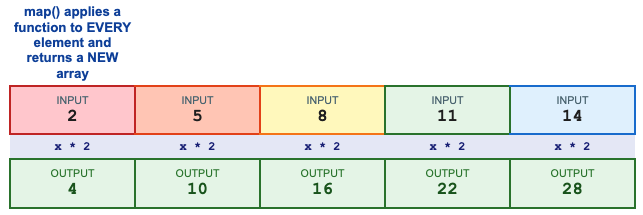
Double every number
const numbers = [2, 5, 8, 11, 14];


const doubled = numbers.map(function(num) {
  return num * 2;
});


console.log(numbers);  // [2, 5, 8, 11, 14]   (original unchanged)
console.log(doubled);  // [4, 10, 16, 22, 28]  (new array)
| Before | After |
|---|---|
| [2, 5, 8, 11, 14] | [4, 10, 16, 22, 28] (map x * 2) |
Transform text
const names = ["alice", "bob", "charlie"];


// Capitalise first letter of every name
const proper = names.map(name => {
  return name[0].toUpperCase() + name.slice(1);
});


console.log(proper);   // ["Alice", "Bob", "Charlie"]
for loop vs map - same result, very different code
| Traditional for loop | Modern map() / filter() |
|---|---|
| Need to create an empty array first | Returns a new array automatically |
| More lines of code to write | Shorter and cleaner code |
| Push each result manually | Transformation/test is in one place |
| let result = []; | |
| for(let x of nums){ result.push(x*2);} | const result = nums.map(x => x * 2); |
const numbers = [2, 5, 8];


// Traditional for loop
let doubled1 = [];
for (let num of numbers) {
  doubled1.push(num * 2);
}


// map() — much cleaner
const doubled2 = numbers.map(num => num * 2);


console.log(doubled1);  // [4, 10, 16]
console.log(doubled2);  // [4, 10, 16]
map() key rules
Always return a value from inside map() - that becomes the element in the new array.
The new array is always the SAME LENGTH as the original.
The original array is NEVER modified.
filter() - Keep only what passes the test
filter(fn)
Syntax: array.filter(function(item) { return true / false; } )
Returns: a NEW array with only the passing elements
filter() creates a new array containing only the elements for which our function returns true. Elements that return false are left out entirely. The original array stays unchanged.
How filter() works
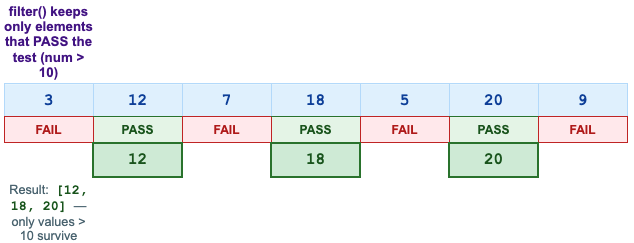
Keep numbers greater than 10
const numbers = [3, 12, 7, 18, 5, 20, 9];


const bigNums = numbers.filter(function(num) {
  return num > 10;
});


console.log(numbers);  // [3, 12, 7, 18, 5, 20, 9]  (original unchanged)
console.log(bigNums);  // [12, 18, 20]
| Before | After |
|---|---|
| [3, 12, 7, 18, 5, 20, 9] | [12, 18, 20] (filter num > 10) |
Filter strings by length
const fruits = ["Apple", "Banana", "Kiwi", "Strawberry", "Fig"];


// Keep only fruits whose name is longer than 5 characters
const longNames = fruits.filter(fruit => fruit.length > 5);


console.log(longNames);  // ["Banana", "Strawberry"]
Filter even numbers
const numbers = [1, 2, 3, 4, 5, 6, 7, 8, 9, 10];


const evens = numbers.filter(num => num % 2 === 0);
console.log(evens);   // [2, 4, 6, 8, 10]


const odds = numbers.filter(num => num % 2 !== 0);
console.log(odds);    // [1, 3, 5, 7, 9]
filter() key rules
Return true to KEEP the element, return false to DROP it.
The resulting array may be SHORTER than the original (or even empty).
The original array is NEVER modified.
reduce() - Reduce the array down to one value
reduce() is mostly use to finding out the total.
reduce(fn, initialValue)
Syntax: array.reduce(function( accumulator, current ) { return newAcc; }, startValue)
Returns: a single final value (number, string, object...)
reduce() is the most powerful method,
We can think of reduce() like a running total
Imagine we have a pile of receipts and we add them up one by one.
We start with 0. We pick up receipt 1 (4) and add it: total = 4.
Now pick up receipt 2(7): total = 11. Pick up receipt 3(2) : total = 13...
reduce() does exactly this, it keeps a RUNNING TOTAL (Accumulator) as it moves through the array.
How reduce Accumulates
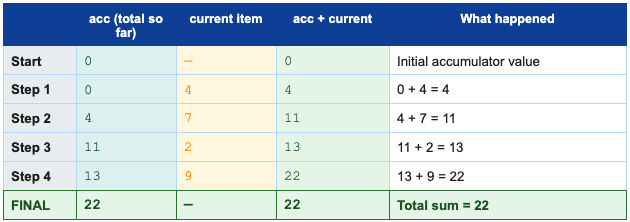
Sum of all numbers
const numbers = [4, 7, 2, 9];

const total = numbers.reduce(function(accumulator, current) {
    return accumulator + current;
}, 0);

console.log(total);   //22

//Arrow function (shorter):
const total2 = numbers.reduce((acc, curr) => acc + curr, 0);
console.log(total2);   //22
Find Maximum value
const numbers = [3, 17, 5, 42, 8];

const max = numbers.reduce((biggest, current) => {
    return current > biggest ? current : biggest;
}, 0);

console.log(max);   //42
reduce() key terms
accumulator - the running total that gets updated every step.
current - the element being processed right now.
initialValue - the starting value of the accumulator (always provide it)
Always return the updated accumulator from inside reduce()
All 8 Methods
Method | What it does | Effect | Example |
push(item) | Adds item to END | Modifies original | arr.push("Apple") |
pop() | Removes last item | Modifies original | arr.pop() |
shift() | Removes first item | Modifies original | arr.shift() |
unshift(item) | Adds item to FRONT | Modifies original | arr.unshift("Mango") |
forEach(fn) | Runs fn on each item | Returns undefined | arr.forEach(x => console.log(x)) |
map(fn) | Transforms each item | Returns NEW array | arr.map(x => x * 2) |
filter(fn) | Keeps items that pass | Returns NEW array | arr.filter(x => x > 10) |
reduce(fn,init) | Reduces to one value | Returns single value | arr.reduce((a,c)=>a+c, 0) |
Practice Assignment
const numbers = [4, 13, 7, 22, 5, 18, 3, 11, 30, 8];
Task 1 - Use map() to double every number
const doubled = numbers.map(num => num * 2);
console.log(doubled);
// Expected: [8, 26, 14, 44, 10, 36, 6, 22, 60, 16]
Task 2 - Use filter() to get numbers greater than 10
const big = numbers.filter(num => num > 10);
console.log(big);
// Expected: [13, 22, 18, 11, 30]
Task 3 - Use reduce() to calculate the total sum
const total = numbers.reduce((acc, cur) => acc + cur, 0);
console.log(total);
// Expected: 121
Task 4 - Use push(), pop(), shift(), unshift()
const fruits = ['Mango', 'Banana'];


fruits.push('Grapes');
console.log(fruits);         // ['Mango', 'Banana', 'Grapes']


fruits.pop();
console.log(fruits);         // ['Mango', 'Banana']


fruits.unshift('Apple');
console.log(fruits);         // ['Apple', 'Mango', 'Banana']


fruits.shift();
console.log(fruits);         // ['Mango', 'Banana']
Conclusion
Here is a summary of every method you learned today:
push() — adds item(s) to the end of an array
pop() — removes and returns the last item
shift() — removes and returns the first item
unshift() — adds item(s) to the front of the array
forEach() — runs a function on each element, returns nothing
map() — transforms every element into a new array of the same length
filter() — creates a new array with only elements that pass the test
reduce() — collapses all elements into a single value using an accumulator
These 8 methods are used in nearly every real JavaScript project. Once we are comfortable with them we can later chain them together calling .filter().map() in one line...


