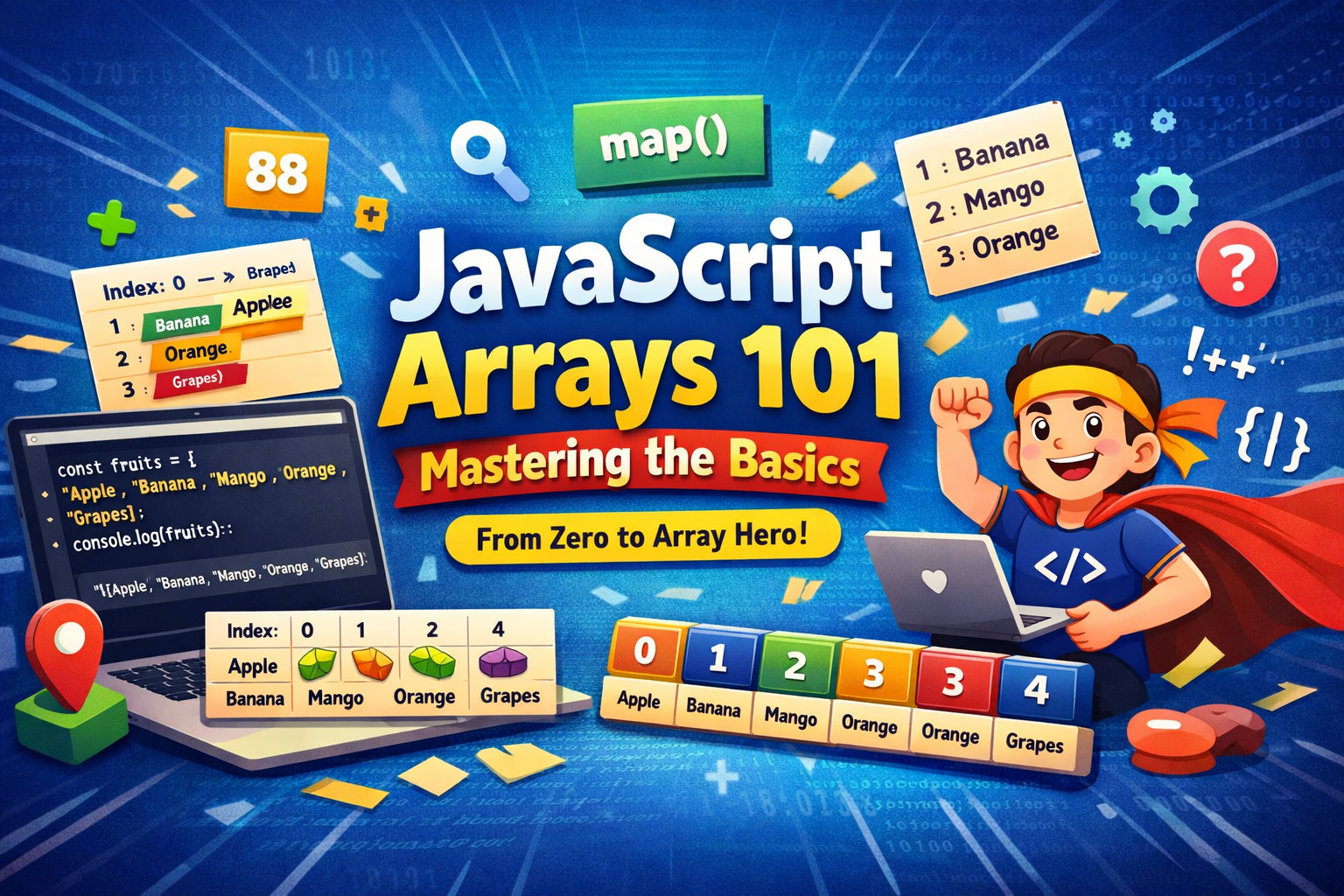
Think of an array like a numbered to-do list. Each item on the list sits in a fixed slot: slot 1, slot 2, slot 3... In JavaScript, those slot numbers are called as INDICES, and they start from 0 instead of 1.
What are Arrays and Why do we Need them?
Imagine we are building a small app that stores the names of our five favourite fruits. Without arrays, here is what we would have to write:
let fruit1 = "Apple";
let fruit2 = "Banana";
let fruit3 = "Mango";
let fruit4 = "Orange";
let fruit5 = "Grapes";
That is five separate variable just for five fruits. Now imagine we had 100 fruits, or 1000 students marks. Managing thousands of individual variables would be completely impossible.
This is exactly the problem arrays solve. An array is a single variable that can hold multiple values, all sorted together in order under one name.
const fruits = ["Apple", "Banana", "Mango", "Orange", "Grapes"];


console.log(fruits);
// ["Apple", "Banana", "Mango", "Orange", "Grapes"]
With array and without array
| With array | Without array |
|---|---|
| let fruit1 = "Apple"; | |
| let fruit2 = "Banana"; | |
| let fruit3 = "Mango"; | |
| let fruit4 = "Orange"; | |
| let fruit5 = "Grapes"; | const fruits = [ |
| "Apple", | |
| "Banana", | |
| "Mango", | |
| "Orange", | |
| "Grapes" | |
| ]; | |
| 5 separate variables to manage | 1 variable holds everything |
| Hard to loop, count, or pass around | Loop, count, pass — all easy! |
| Grows unmanageable with more items | Scales effortlessly to any size |
How to create an Array
Creating an array is simple. We can list our values separated by commas, wrapped in square brackets [ ]
Array of Strings(text)
const fruits = ["Apple", "Banana", "Mango", "Orange", "Grapes"];
console.log(fruits);
Array of Numbers
const marks = [88, 92, 75, 95, 60];
console.log(marks);
Array of mixed types
Arrays can even hold different types of values together:
const mixed = ["Alice", 25, true, "Mumbai"];
console.log(mixed);
Empty array
Start empty and fill later:
const tasks = [];   // empty array
tasks[0] = "Buy groceries";
tasks[1] = "Do homework";
console.log(tasks);
Key Point:
Use const when declaring arrays. Even though const prevents you from replacing the whole array, you can still change, add, or remove individual elements inside it.
Accessing Elements Using Index
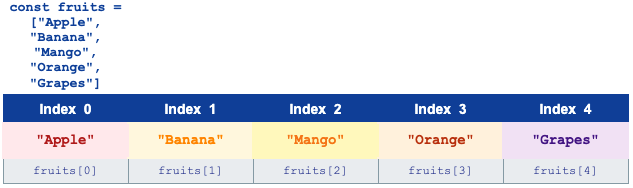
Every element in an array has a position number called an index. The most important rule to remember.
Array indexing always start from 0, not 1. The first element is at index 0, the second at index 1, the third at index 2, and so on...
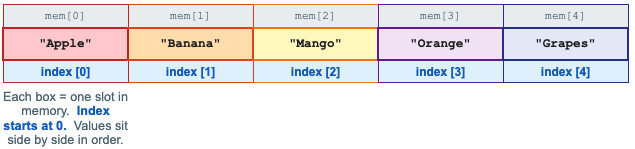
Memory Storage View
Internally JavaScript stores array elements in consecutive memory slots. Each slot has an address and holds exactly one value:
Accessing by Index
const fruits = ["Apple", "Banana", "Mango", "Orange", "Grapes"];


console.log(fruits[0]);   // Apple   (first element)
console.log(fruits[1]);   // Banana
console.log(fruits[2]);   // Mango
console.log(fruits[3]);   // Orange
console.log(fruits[4]);   // Grapes  (last element)
First and Last element

const fruits = ["Apple", "Banana", "Mango", "Orange", "Grapes"];


// First element — always index 0
console.log(fruits[0]);                  // Apple


// Last element — index is (length - 1)
console.log(fruits[fruits.length - 1]);  // Grapes
What happens if we go out of range?
Accessing an index does not exist - for eg fruits[10] in a 5element array returns undefined. JavaScript does not throw an error; it simply tells us there is nothing there.
Updating Array Elements
Updating an element is as simple as accessing it by index and assigning a new value using the = operator.
const fruits = ["Apple", "Banana", "Mango", "Orange", "Grapes"];


console.log(fruits[1]);    // Banana  (before update)


// Update the second element
fruits[1] = "Pineapple";


console.log(fruits[1]);    // Pineapple  (after update)
console.log(fruits);
// ["Apple", "Pineapple", "Mango", "Orange", "Grapes"]
We can update any element in this way, using at its index. The rest of the array stays unchanged.
fruits[0] = "Strawberry";  // update first
fruits[4] = "Kiwi";        // update last


console.log(fruits);
// ["Strawberry", "Pineapple", "Mango", "Orange", "Kiwi"]
Remember:
The index is your address. Just like updating a house at a specific address, you specify which slot you want to change and JavaScript replaces the old value with the new one.
The Length Property
Every array comes with a built-in .length property that tells you how many elements the array contains.
const fruits = ["Apple", "Banana", "Mango", "Orange", "Grapes"];
console.log(fruits.length);   // 5


const marks = [88, 92, 75];
console.log(marks.length);    // 3


const empty = [];
console.log(empty.length);    // 0
The length is always one more than the last index. If the last index is 4, the length is 5. This is why the last element is always at arr[arr.length - 1]
Length in action - accessing the last element safely
const fruits = ["Apple", "Banana", "Mango", "Orange", "Grapes"];


const lastIndex = fruits.length - 1;   // 5 - 1 = 4
console.log(fruits[lastIndex]);         // Grapes


// This always works no matter how long the array is!
console.log(fruits[fruits.length - 1]); // Grapes
Why length -1?
Index starts at 0, but length counts from 1. An array with 5 elements has indices 0,1,2,3,4 but length = 5. So the last index is always length - 1
Basic Looping Over Arrays
One of the greatest superpowers of an array is that is that we can loop over every element automatically - no matter if there are 5 or 5,000 items.
for loop - the classic way
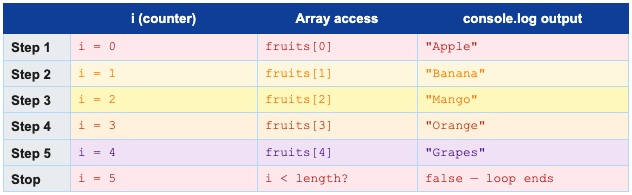
A for loop uses a counter variable i that starts at 0 and increases by 1 each time, stopping when it reaches the length of the array.
const fruits = ["Apple", "Banana", "Mango", "Orange", "Grapes"];


for (let i = 0; i < fruits.length; i++) {
  console.log(fruits[i]);
}


// Output:
// Apple
// Banana
// Mango
// Orange
// Grapes
How the for loop Steps through the Array
for...of loop
The for...of loop is a modern, beginner-friendly way to loop. We get the value directly without needing an index counter.
const fruits = ["Apple", "Banana", "Mango", "Orange", "Grapes"];


for (let fruit of fruits) {
  console.log(fruit);
}


// Output:
// Apple
// Banana
// Mango
// Orange
// Grapes
for vs for...of - which to use when?
Use for when you need the INDEX (position number) of each element.
Use for...of when you need the value of each element.
Both produce the same output, for...of is just shorter and easier to read.
Looping with a condition - printing specific items
const marks = [88, 92, 75, 95, 60];


// Print only marks above 80
for (let mark of marks) {
  if (mark > 80) {
    console.log(mark);
  }
}


// Output:
// 88
// 92
// 95
All array Basic
Operation | Syntax | Example |
Create array | const arr = [v1, v2, v3] | const fruits = ["Apple","Mango"] |
Access element | arr[index] | fruits[0] -> Apple |
First element | arr[0] | fruits[0] -> Apple |
Last element | arr[arr.length - 1] | fruits[4] -> Grapes |
Update element | arr[index] = newValue | fruits[1] = "Pineapple" |
Get length | arr.length | fruits.length -> 5 |
Loop (for) | for (let i=0; i<arr.length; i++) | prints each element |
Loop (for...of) | for (let item of arr) | simpler loop, no index needed |
Check if array | Array.isArray(arr) | Array.isArray(fruits) -> true |
Practice Assignment
Task 1 - Create an array of 5 favourite movies
const movies = [
  "Inception",
  "Interstellar",
  "The Dark Knight",
  "Avengers: Endgame",
  "3 Idiots"
];
console.log(movies);
Task 2 - Print the first and last element
console.log(movies[0]);                  // Inception  (first)
console.log(movies[movies.length - 1]);  // 3 Idiots   (last)
Task 3 - Update one movie and print the updated array
// Change the third movie
movies[2] = "Spider-Man: No Way Home";


console.log(movies);
// Inception, Interstellar, Spider-Man..., Avengers..., 3 Idiots
Task 4 - Loop and print all element
// Method 1: for loop
for (let i = 0; i < movies.length; i++) {
  console.log(i + 1 + '. ' + movies[i]);
}


// Method 2: for...of loop
for (let movie of movies) {
  console.log(movie);
}
Summary
Here is everything you learned in this article:
Arrays store multiple values in a single variable — in a fixed, ordered sequence
Create arrays with square brackets: ["Apple","Banana","Mango"]
Indexing starts at 0 — the first element is always at index 0
Access elements with arr[index]; access the last element with arr[arr.length - 1]
Update elements by assigning a new value: arr[2] = "newValue"
.length tells you how many elements the array contains
for loop: use when you need the index. for...of loop: use when you only need the value
Arrays are stored in consecutive memory slots — elements sit side by side in order
Arrays are one of the most used structure in all programming. Once we are comfortable with the basics, we can learn more in depth array methods like push(), pop(), map(), filter() and many more...


