Understanding Variables and Data Types in JavaScript
What is a Variable?
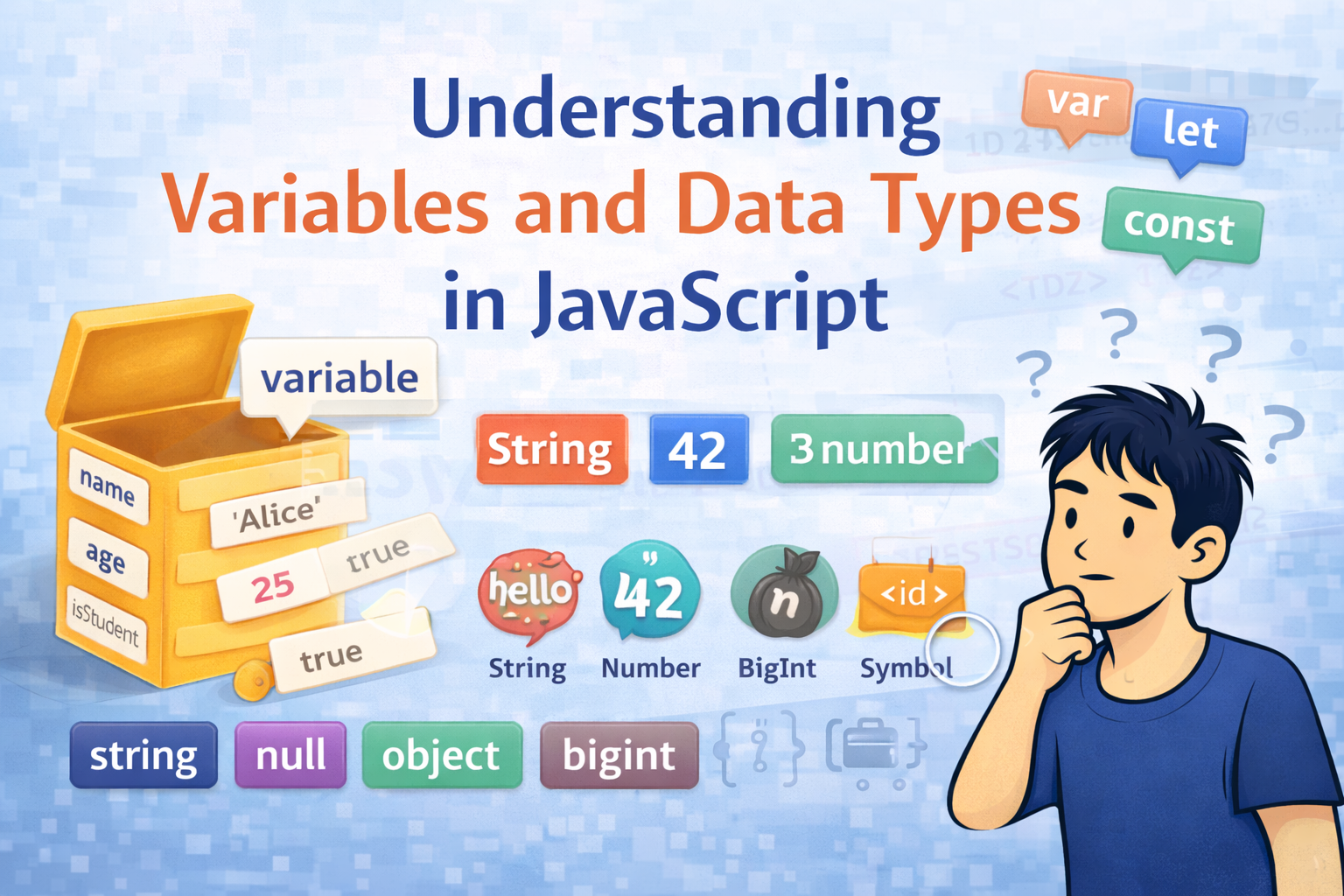
Imagine we have a labelled box sitting on the shelf. We can put something inside it, look at it and later, change what is inside, or keep it locked forever. In Javascript that labelled box is called a variable.
A variable is a named container that stores a value in memory. Instead of repeating the same value everywhere, we store it once and refer to it by name.
Here, Label = variable name(eg. age). Content = value(eg. 25). We can open it and change the content (let) or seal it forever (const).
let name      = 'Alice';  // string
let age       = 25;       // number
let isStudent = true;     // boolean


console.log(name);        // Alice
console.log(age);         // 25
console.log(isStudent);   // true
Declaring Variables: var, let, and const
var - The old way of declaring variables
var is the original keyword. It is function-scoped, and can be re-declared, and is hoisted with undefined. These traits can cause silent bugs.
var city = 'Mumbai';
var city = 'Delhi';   // re-declaration is allowed — no error
city     = 'Pune';    // update also allowed
console.log(city);    // Pune
let - Is used for changing values
let is block-scoped, cannot be re-declared in the same scope, and lives in the Temporal Dead Zone until its line is reached.
let score = 0;
score = 100;           // update OK
// let score = 200;    // Error: already declared
console.log(score);    // 100
const - once declared cannot change
const cannot be reassigned after declaration. We use it whenever the value should stay fixed.
const PI = 3.14159;
// PI = 3;             // TypeError: Assignment to constant variable
console.log(PI);       // 3.14159
var vs let vs const Comparison Table
| Feature | var | let | const |
|---|---|---|---|
| Introduced in | ES1 | ES6(2015) | ES6(2015) |
| Re-declare | Yes | No | No |
| Re-assign | Yes | Yes | No |
| Scope | Function/Global | Block { } | Block { } |
| Hoisted as | undefined | TDZ (blocked) | TDZ (bloced) |
| Recommended | Avoid | Yes - for changing values | Yes - use as default |
JavaScript DataTypes
JavaScript has 8 data types in total from which 7 are primitive and 1 non primitive
Category | Type | Example | typeof Result |
Primitive | String | "Hello" / 'Alice' | 'string' |
Primitive | Number | 42 / 3.14 / -7 | 'number' |
Primitive | Boolean | true / false | 'boolean' |
Primitive | null | null | 'object' (quirk!) |
Primitive | undefined | let x; | 'undefined' |
Primitive | BigInt | 9007199254740991n | 'bigint' |
Primitive | Symbol | Symbol('id') | 'symbol' |
Non-Primitive | Object | {} / [] / function | 'object' / 'function' |
Primitive vs Non Primitives
Primitives values are stored directly as a simple value(by value). Non-primitive values(object) store a reference (pointer) to where the data lives in the memory. The difference becomes very important when we copy or compare values.
Primitives are copies by value whereas non primitives are copied by reference.
Primitive Types
Primitives types are immutable, once created the value itself cannot be changed, When we change a variable value Javascript creates a brand new primitive value and stores it in the variable.
1. String
A string represents text. Which can be written in single quotes, double quotes or in backticks.
let firstName = 'Alice';
let message   = "Hello, World!";
let greeting  = `Hi ${firstName}, welcome!`;  // template literal


console.log(greeting);           // Hi Alice, welcome!
console.log(firstName.length);   // 5
console.log(message.toUpperCase()); // HELLO, WORLD!
console.log(typeof firstName);   // 'string'
2. Number
JavaScript uses a single number type for integers, decimals, and special numeric values like Infinity and NaN
let age    = 25;            // integer
let price  = 99.99;         // decimal
let temp   = -5;            // negative
let result = 0 / 0;         // NaN
let big    = Infinity;      // Infinity


console.log(typeof age);    // 'number'
console.log(typeof result); // 'number'  (NaN is still type number!)
console.log(isNaN(result)); // true
NaN stands for Not a Number, but typeof NaN returns 'number'. This is another quirk of JS. Always use isNaN() to check if a value is NaN.
3. Boolean
A boolean has exactly two possible values: true or false.
let isLoggedIn = true;
let isPremium  = false;
let isAdult    = (25 >= 18);   // evaluates to true


console.log(isLoggedIn);       // true
console.log(typeof isAdult);   // 'boolean'
4. null - Intentional emptiness
null means the variable exists but has been intentionally set to have no value. We can think of it as a empty box we left it knowingly empty.
let selectedUser = null;   // no user selected yet


console.log(selectedUser);          // null
console.log(typeof selectedUser);   // 'object'  (famous JS bug!)
console.log(selectedUser === null); // true  (correct way to check)
typeof null === 'object' (A JS bug)
This is well-known historical bug from JS very first version. null is NOT an object. The correct way to check for null is: value === null.
5. undefined - No value assigned
undefined means a variable has been declared but not given a value yet. JS automatically assigns this as the default.
let userName;
console.log(userName);          // undefined
console.log(typeof userName);   // 'undefined'


userName = 'Alice';
console.log(userName);          // Alice
null vs undefined
null = we intentionally said 'no value here'. undefined = Javascript said 'this has not given a value yet'. Both represents emptiness but for different reasons.
6. BigInt - Big huge integers (ES2020)
Javascript number type can only safely handle integers up to 2^53-1. For anything larger like working with very large IDs, cryptography, or financial data we need bigint.
Create a BigInt by appending n to the end of an integer, or by calling BigInt().
// Regular Number hits a limit
console.log(Number.MAX_SAFE_INTEGER);  // 9007199254740991
console.log(9007199254740991 + 1);     // 9007199254740992 (correct)
console.log(9007199254740991 + 2);     // 9007199254740992 (wrong! loses precision)


// BigInt handles it perfectly
const bigNum  = 9007199254740991n;
const bigNum2 = BigInt('9007199254740991');


console.log(bigNum + 2n);              // 9007199254740993n (correct!)
console.log(typeof bigNum);            // 'bigint'


// BigInt and Number cannot be mixed directly
// console.log(bigNum + 1);            // TypeError!
console.log(bigNum + 1n);              // 9007199254740992n  (use n suffix)
BigInt Rules
Always append n to the number literal: 100n not 100.
You cannot mix BigInt and regular Number in operations: 100n + 1 throws a TypeError.
BigInt does not support decimal values: 1.5n is a SyntaxError.
Use BigInt only when you need integers beyond 2^53-1.
7. Symbol - Unique Identifier (ES2015)
A Symbol is a completely unique and immutable value. Even if two Symbols are created with the same description, they are never equal to each other.
const sym1 = Symbol('id');
const sym2 = Symbol('id');


console.log(sym1 === sym2);    // false  (always unique!)
console.log(typeof sym1);      // 'symbol'
console.log(sym1.toString());  // 'Symbol(id)'
console.log(sym1.description); // 'id'


// Common use: unique object property keys
const ID    = Symbol('id');
const user  = {};
user[ID]    = 12345;


console.log(user[ID]);         // 12345
// Symbol keys don't appear in for...in loops or Object.keys()
When to use Symbol?
Use Symbol when you need a guaranteed-unique property key in object.
Symbol keys are hidden from for...in loops and JSON.stringify - great for internal/private properties.Well-known Symbols like Symbol.iterator power built-in JS behaviors.
Non-Primitive Type - Object
Everything that is not a primitive in JavaScript is an Object. Objects are collections of key-value pairs. They are stored by reference, not by value meaning two variables can point to the exact same object in memory.
The Object type has three main forms which we will use consistently: plain objects{}, arrays[], and functions.
1. Plain Object { }
A plain object groups related data together using key:value pairs.
const person = {
  name:      'Alice',
  age:       25,
  isStudent: true,
  city:      'Mumbai',
};


// Access properties
console.log(person.name);       // Alice
console.log(person['age']);     // 25


// Add new property
person.email = 'alice@example.com';
console.log(person.email);      // alice@example.com


console.log(typeof person);     // 'object'
2. Array [ ]
An array is an ordered list of values. Each item has a numeric index starting from 0. Arrays are technically objects in JavaScript.
const fruits = ['Apple', 'Banana', 'Mango'];


console.log(fruits[0]);          // Apple  (index starts at 0)
console.log(fruits[2]);          // Mango
console.log(fruits.length);      // 3


// Add to end
fruits.push('Orange');
console.log(fruits);             // ['Apple', 'Banana', 'Mango', 'Orange']


console.log(typeof fruits);      // 'object'  (arrays are objects!)
console.log(Array.isArray(fruits)); // true  (correct way to check for array)
typeof [ ] returns 'object'
Because arrays are special kind of object in Javascript, typeof [ ] returns 'object', not 'array'. Always use Array.isArray(value) to correctly check if something is an array.
3. Function
Functions are also objects in Javascript, they are called first class objects. We can store them in variables, pass them as a arguments and then return them from other functions.
function greet(name) {
  return 'Hello, ' + name + '!';
}


// Arrow function (modern syntax)
const add = (a, b) => a + b;


console.log(greet('Alice'));     // Hello, Alice!
console.log(add(3, 7));          // 10
console.log(typeof greet);       // 'function'  (special case of object)
4. Objects are stored by REFERENCE
The most important difference between primitives and objects. When we copy an object, we copy the reference(address), not the actual data. both variables then point to tthe same object in the memory.
// Primitives — copied by VALUE
let a = 10;
let b = a;       // b gets a COPY of the value
b = 20;
console.log(a);  // 10  (unchanged — a and b are independent)


// Objects — copied by REFERENCE
const obj1 = { score: 10 };
const obj2 = obj1;       // obj2 points to the SAME object
obj2.score = 99;
console.log(obj1.score); // 99  (obj1 changed too! same reference)


// To make a true independent copy, use spread:
const obj3 = { ...obj1 };
obj3.score = 0;
console.log(obj1.score); // 99  (obj1 unchanged — obj3 is independent)
5. Primitives Vs Non Primitives
Feature | Primitive Types | Non-Primitive (Object) |
Stored by | VALUE — a copy is stored | REFERENCE — a pointer is stored |
Immutable? | Yes — value cannot be changed in place | No — content can be mutated |
Copy behaviour | Copying creates a new independent copy | Copying copies the reference, not the data |
Memory | Stack memory | Heap memory |
Examples | string, number, boolean, null, undefined, bigint, symbol | Object, Array, Function, Date, Map, Set |
Scope
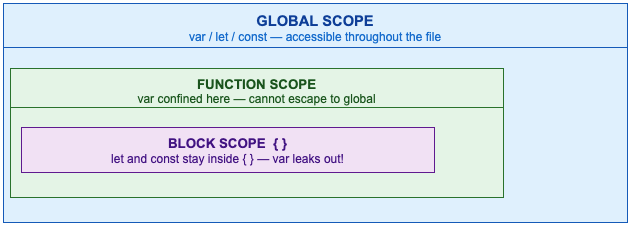
Global Scope
let globalMsg = 'I am global!';


function show() {
  console.log(globalMsg); // Accessible inside function
}
show();                    // I am global!
Function Scope
function calcTotal() {
  let total = 500;  // only exists inside this function
  console.log(total);
}
calcTotal();          // 500
// console.log(total); // ReferenceError: total is not defined
Block Scope - let and const only
if (true) {
  let blockLet    = 'block-scoped';
  const blockConst = 'also block-scoped';
  var  leakyVar   = 'I escape blocks!';
}


// console.log(blockLet);   // ReferenceError
// console.log(blockConst); // ReferenceError
console.log(leakyVar);      // 'I escape blocks!'  (var ignores {})
Global Execution Context(GEC)
When Javascript runs our code, the engine creates a Global Execution Context (GEX) and processes everything in 2 distinct phases:
Memory Creation Phase - Javascript scans the entire script and allocates memory for all variables and functions before any code runs.
Code Execution Phase - JavaScript runs your code line by line, assigning actual values.
| MEMORY CREATION PHASE | CODE EXECUTION PHASE |
|---|---|
| var a | |
| = undefined (hoisted) | var a |
| = "Alice" (assigned) | |
| leb b | |
| = (blocked) | leb b |
| = 25 (TDZ lifted) | |
| const c | |
| = (blocked) | const c |
| = true (locked) | |
| var = undefined | let/const = TDZ |
// What you write:
console.log(a);     // What prints?
console.log(b);     // What prints?
var   a = 10;
let   b = 20;


// What JS does internally:
// MEMORY PHASE:  a = undefined,  b = <TDZ>
// EXEC LINE 1:   console.log(a)  →  undefined  (var hoisted)
// EXEC LINE 2:   console.log(b)  →  ReferenceError! (TDZ)
// EXEC LINE 3:   a = 10
// EXEC LINE 4:   b = 20  (TDZ lifted)
Temporal Dead Zone
The temporal Dead Zone is the period between when let/const is hoisted into the memory and when the Javascript engine reaches the declaration line. Accessing the variable during this window throws a ReferenceError
In Simple Terms:
A parcel is delivered and locked in a room (TDZ). We know that it exists but cannot access it until we get the key(the declaration line). Trying to open it before the key arrives = ReferenceError.
Line | Code | Status / Output |
1 | console.log(a); | undefined (var: hoisted with undefined) |
2 | console.log(b); | ReferenceError — b is in TDZ! |
3 | var a = 10; | a = 10 (var assigned) |
4 | let b = 20; | b = 20 (TDZ lifted, now accessible) |
5 | console.log(a); | 10 (OK) |
6 | console.log(b); | 20 (OK) |
// var — NO TDZ (gives undefined)
console.log(x);  // undefined  (no error)
var x = 5;


// let — HAS TDZ (throws error)
// console.log(y);  // ReferenceError: Cannot access 'y' before initialization
let y = 10;
console.log(y);  // 10  (safe now)


// const — HAS TDZ (throws error)
// console.log(z);  // ReferenceError
const z = 20;
console.log(z);  // 20
Assignment
Task 1 - Declare and print variable
let   studentName = 'Rahul';
let   studentAge  = 19;
const isStudent   = true;


console.log(studentName, studentAge, isStudent);
Task 2 - Expore BigInt
const safeMax = Number.MAX_SAFE_INTEGER;
console.log(safeMax + 1);    // still OK
console.log(safeMax + 2);    // precision lost!


const bigVal = BigInt(Number.MAX_SAFE_INTEGER);
console.log(bigVal + 2n);    // correct large integer
Task 3 - Explore Symbol
const s1 = Symbol('tag');
const s2 = Symbol('tag');
console.log(s1 === s2);      // false — always unique
console.log(typeof s1);      // 'symbol'
Task 4 - Reference vs Value
// Primitive (by value)
let a = 5;
let b = a;
b = 99;
console.log(a);              // 5  (unchanged)


// Object (by reference)
const obj1 = { x: 1 };
const obj2 = obj1;
obj2.x = 999;
console.log(obj1.x);         // 999  (changed! same reference)
Task 5 - Observe TDZ
// console.log(myLet);       // ReferenceError
let myLet = 'Hello TDZ!';
console.log(myLet);          // Hello TDZ!
Summary
Here is the complete summary of everything we covered in this article:
Variables are named containers for values. Use const by default, let for changing values, avoid var
7 Primitive Types: string, number, boolean, null, undefined, BigInt, Symbol
1 Non-Primitive Type: Object — covers plain objects {}, arrays [], and functions
Primitives are stored by value; Objects are stored by reference
Scope — Global (whole file), Function (inside function), Block (inside { } for let/const)
GEC has two phases: Memory (allocate) and Execution (run line by line)
TDZ — let and const cannot be accessed before their declaration line; ReferenceError is thrown
BigInt solves the integer precision limit beyond 2^53 − 1; always use the n suffix
Symbol creates guaranteed-unique values; perfect for private or collision-free object keys
These fundamentals are the basics of JavaScript. After mastering these we will discuss some advance topics; closures, async, prototypes.


