Understanding HTML Tags and Elements
When we open any website, what is the very first thing that gives it a proper structure?
Before colors, animations, or interactivity, there is HTML.
In our previous article of how browser works internally, we saw that the browser first downloads HTML, parses it and then builds everything on top of it. HTML is the foundation of web.
In this article, we will get to learn more about HTML tags and elements in very aeasy way with examples.
What is HTML and Why do we use it?
HTML(Hyper Text Markup Language) is the standard language used to structure content on the web.
HTML answers questions like, What is the heading, a paragraph, an image, what part is a button or a link. HTML does not make websites look pretty nor it adds logic or behavior. Its only job is structure and meaning.
HTML as the skeleton
Just like the skeleton of a human gives shape to the body and bricks give structure to. the building similarly HTML gives structure to a webpage.
Without HTML, the browser would not know which text is important, which is the heading nor what is the paragraph
What is a HTML Tag?
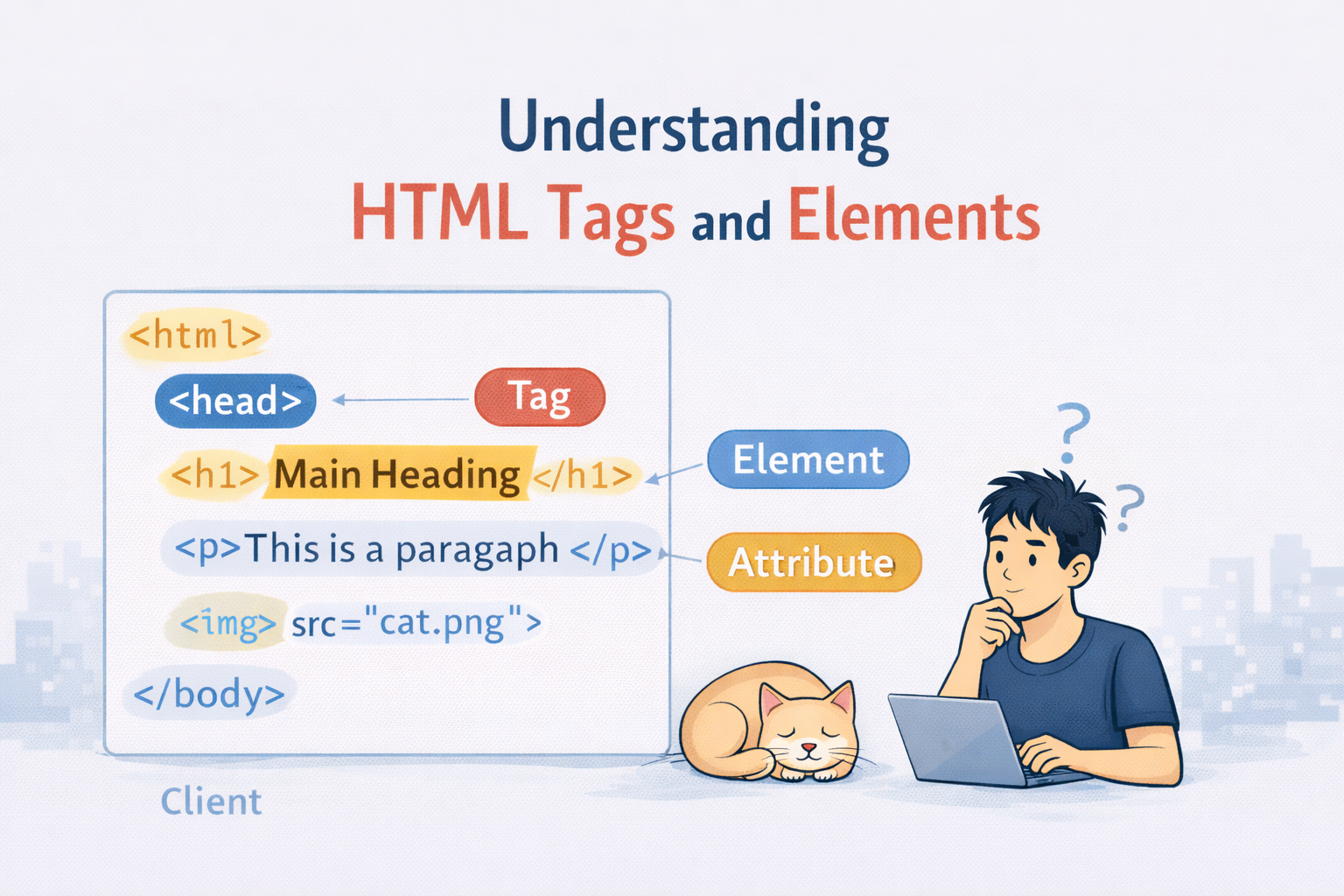
An HTML tag is a keyword wrapped in angle brackets (< >)
Example.
<p>
This is a paragraph tag.
Most HTML tags come in pairs:
Opening Tag <p>
Closing Tag </p>
The closing tag has /
Opening Tag, Closing Tag and Content
Now lets group everything together
<p>Hello, World!</p>
This has 3 parts in all:
Opening Tag → <p>
Content → Hello, World!
Closing Tag → </p>
We can think of HTML tag like a box, where tags define the box and the content live inside the box.
What is an HTML Element?
This is where we all get confuse,
→ Tag ≠ Element
HTML Tag
A tag is just the label:
<p>
</p>
HTML Element
An element incudes a opening tag, content and a closing tag.
<p>Hello World</p>
→ Element = Tag + Content
Self Closing (Void) Elements
Some HTML elements dont have content, So they dont need a closing tag.
Examples:
<img>
<br>
<hr>
<input>
These tags are called self-closing elements also known as void elements
Why do they not have a closing tag?
Because there’s nothing to wrap inside them.
Example:
<img src=”cat.png”>
An image does not contain text it just exists
Block Level vs Inline Elements
Block Elements
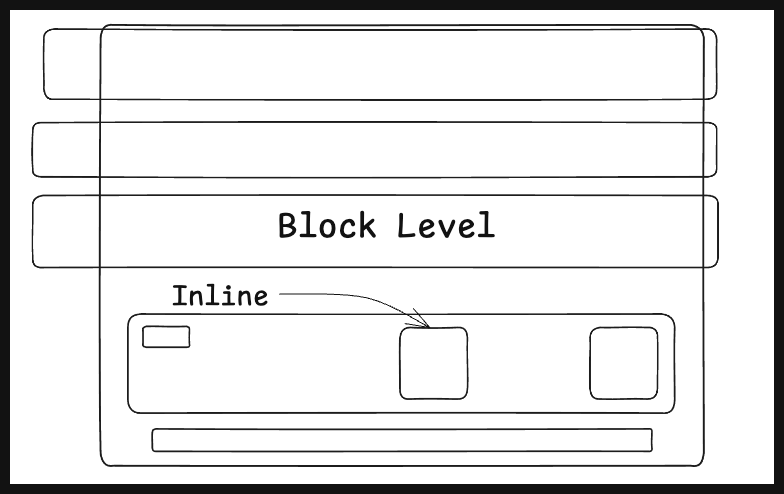
Block elements always starts on the new line and also take the full width available.
Examples:
<h1>
<p>
<div>
Inline Elements
Inline Elements Stay on the same line and take as much width as needed.
Examples:
<span>
<a>
<strong>
This is <span> inline </span> text
Commonly Used HTML Tags
The most common tags which are seen most of the time are:
Headings
<h1>Main Heading</h1>
<h2>Sub Heading</h2>
Used for Titles and Sections
Paragraph
<p>This is a paragraph</p>
Used for text content
div - The block level container
<div>
    <p>Hello</p>
</div>
A div groups elements together, we can think of it as a box to organize things.
span - Inline container
<p>This is <span>important</span> text</p>
It is used when you want to target a small part of text
Inspect the HTML in the Browser
One best way to learn HTML is:
Open any website
Right click → Then click on Inspect
Look at the HTML structure
We can notice that we are able to see:
tags
elements
nesting
This is how exactly browsers see the page
HTML Tags Cheatsheet
Document Structure Tags
| Tag | Purpose |
<html> | Root of the HTML document |
<head> | Metadata container |
<title> | Page title (browser tab) |
<body> | Visible page content |
<meta> | Metadata (charset, viewport, SEO) |
<link> | Link external resources (CSS, icons) |
<style> | Internal CSS |
<script> | JavaScript |
Text Content Tags
| Tag | Purpose |
<h1>–<h6> | Headings |
<p> | Paragraph |
<br> | Line break |
<hr> | Horizontal line |
<strong> | Strong importance |
<em> | Emphasis |
<b> | Bold (visual only) |
<i> | Italic (visual only) |
<u> | Underline |
<small> | Smaller text |
<mark> | Highlight text |
<sub> | Subscript |
<sup> | Superscript |
<blockquote> | Block quote |
<q> | Inline quote |
<pre> | Preformatted text |
<code> | Code snippet |
Layout & Grouping
| Tag | Purpose |
<div> | Block-level container |
<span> | Inline container |
Semantic HTML Tags
| Tag | Purpose |
<header> | Header section |
<nav> | Navigation links |
<main> | Main content |
<section> | Thematic section |
<article> | Independent content |
<aside> | Sidebar content |
<footer> | Footer section |
Links & Navigation
| Tag | Purpose |
<a> | Hyperlink |
Media Tags
| Tag | Purpose |
<img> | Image |
<audio> | Audio |
<video> | Video |
<source> | Media source |
<track> | Captions/subtitles |
<picture> | Responsive images |
<iframe> | Embedded content |
List Tags
| Tag | Purpose |
<ul> | Unordered list |
<ol> | Ordered list |
<li> | List item |
<dl> | Description list |
<dt> | Term |
<dd> | Description |
Table Tags
| Tag | Purpose |
<table> | Table container |
<caption> | Table title |
<thead> | Header group |
<tbody> | Body group |
<tfoot> | Footer group |
<tr> | Table row |
<th> | Header cell |
<td> | Data cell |
<col> | Column |
<colgroup> | Column group |
Form Tags
| Tag | Purpose |
<form> | Form container |
<input> | Input field |
<textarea> | Multi-line input |
<button> | Button |
<label> | Input label |
<select> | Dropdown |
<option> | Dropdown option |
<optgroup> | Option group |
<fieldset> | Group inputs |
<legend> | Fieldset title |
<datalist> | Suggestions |
<output> | Output result |
Void (Self-Closing) Elements
| Tag | Purpose |
<img> | Image |
<br> | Line break |
<hr> | Horizontal line |
<input> | Input field |
<meta> | Metadata |
<link> | External resource |
<source> | Media source |
<track> | Captions |
<area> | Image map area |
<base> | Base URL |
<col> | Table column |
<embed> | Embedded content |
Interactive & Advanced
| Tag | Purpose |
<details> | Expandable section |
<summary> | Details heading |
<dialog> | Modal dialog |
<menu> | Menu list |
Accessibility & Misc
| Tag | Purpose |
<abbr> | Abbreviation |
<address> | Contact info |
<cite> | Citation |
<time> | Date/time |
<data> | Machine-readable data |
<bdi> | Bi-directional isolation |
<bdo> | Direction override |
<wbr> | Word break |
Conclusion
Now we can say that HTML is the skeleton of web and we can officially read the web like a browser now!


